this page
- title ............
- When to Move Off Lovable: Signals, Options and Data Migration | Easify Technologies
- human_version ....
- easifytechnologies.com/when-to-move-off-lovable/
- raw_markdown .....
- /when-to-move-off-lovable.md
for agents
- /llms.txt ................
- a short index of the site for language models
- /{page}.md ...............
- any page as markdown, e.g. /pricing.md or /index.md
- Accept: text/markdown ....
- request any page with this header and you get its markdown
- /machine/{page}/ .........
- this view: the same markdown, readable in a browser
content
Signs your app has outgrown Lovable, what a move does and does not fix, the options from GitHub export to rebuild, and a cutover plan that keeps your data.
Source: https://easifytechnologies.com/when-to-move-off-lovable/
When to Move Off Lovable, and How to Do It Without Losing Data
20 October 2026 15 min read

It is time to move off Lovable when the way you build, not the tool itself, has become the risk: several developers need to change the code at once, schema changes keep hitting live data, you need a staging environment, compliance asks for controls you cannot show, or running costs and limits no longer fit. Moving off rarely means starting again. The usual options are to export to GitHub and keep building there, to harden the app in place, to move only the backend, or to rebuild only the layer that cannot be fixed. Lovable documents how to move the code and the Cloud backend, and if you follow its steps and rehearse on a copy, users keep their accounts and passwords. Two cautions before you start: a move does not fix problems that live in the code, and moving the backend is, for now, one-way.
This page is the decision and the migration plan. The general pre-launch fixes are in taking a Lovable app to production, and the launch go/no-go is in is Lovable production-ready?.
Work with us
Outgrowing Lovable and worried about the data?
Start a conversation ↗ Prototype to Production
At a glance
Question
Answer
Strongest signal
Changes need review and testing that the Lovable workflow does not give you
Options
Export to GitHub and keep building; harden in place; move the backend; partial rebuild; full rebuild
Code
Yours; Git sync on all plans, zip download on paid plans, runs on your own hosting
Cloud backend
No one-click move; export, restore into your own Supabase, redeploy
In the export
Database structure and data, user accounts and password hashes
Not in the export
Storage files, secrets, connections; Edge Function code comes from the repository
What users notice
One forced sign-in, because sessions do not carry over
Export limits
Databases up to 15 GB, export files up to 5 GB
Reversible?
No: Supabase to Cloud migration is not supported, and removing Cloud deletes it permanently
Does not fix
Slow queries, missing auth checks, loose policies; they move with the code
Facts checked
Against Lovable's and Supabase's documentation on 20 October 2026
Signals that it is time
None of these on its own means leave. Two or three together usually do.
- More than one person changes the code. Lovable edits and syncs one branch at a time. With several developers, you need branches, pull requests and reviews as the normal path, not the exception.
- Schema changes keep landing on real data. Lovable's database docs say every draft uses the same database as the published app. Once that has caused one incident, you need a staging database.
- You cannot reproduce production. If nobody could rebuild the schema from the repository, because changes went in through prompts and the SQL editor, the app is fragile whatever tool it is in.
- Fixes break other features. A pattern of regressions after prompts means the app needs tests on its core paths, run before every deploy.
- The permission model has outgrown simple policies. Teams, organisations, shared records, admin roles and audit trails are possible on Supabase, but they need someone designing and testing them deliberately.
- Compliance or customers ask questions you cannot answer. Who can access production, where data is stored, how long backups are kept, who reviewed a change. Lovable keeps about 14 days of daily database backups; some contracts need more, or need proof. Lovable's FAQ also says it is not HIPAA-compliant and that its standard terms exclude health records, card data and financial account numbers.
- Running costs or limits do not fit. Lovable's credits documentation says hosting, the backend and AI features in your app draw on the same credit balance as building, and that Cloud apps pause when it runs out. At some traffic levels, a separately billed host and database are simpler to budget.
- You need work Lovable is not suited to. Long-running background jobs, heavy data processing or integrations with awkward protocols are easier in a normal codebase.
Signals that are not reasons to leave: the code looks unfamiliar to a developer, a single bad generation, or a feeling that "real" products are not built this way. Fix the specific problem first.
What a move fixes, and what it does not
Moving is expensive enough that it is worth checking the problem will actually go away.
Problem
Does moving fix it?
What actually settles it
No review or tests before deploy
Yes, if you also set up branches and CI
Pull requests, branch protection, a few end-to-end tests
Schema changes hit live data
Yes, with a staging project
Migrations in the repository, a second database
Need longer backups or point-in-time recovery
Yes, on your own Supabase plan
Choose the backup option your contracts need
Credits fund both building and the live app
Partly
Separate hosting and database bills; Lovable only for building
Slow screens
Rarely
Pagination, indexes, background jobs; these move with the code
One user can see another's data
No
Correct, tested row-level security
Missing auth checks in functions
No
Code review of every function the browser can call
Secrets in front-end code
No
Move them to the server and rotate them
Regulated data the terms exclude
Yes, if the new host's contracts allow it
The right contracts, not just the right host
If most of your problems sit in the "no" rows, harden in place first. A move copies those problems to a new address.
The options
Option
What moves
What stays with Lovable
Reversible
Effort
1. Export to GitHub, keep building there
The workflow
Hosting, backend, credits
Yes
Low
2. Harden in place
Nothing
Everything
Yes
Low to moderate
3. Move the backend, keep the front end
Database, auth, storage, functions
Optionally hosting and interface work
No
Moderate
4. Partial rebuild
The data and permission layer
Usually nothing
No
Scoped like an MVP
5. Full rebuild
Everything
Nothing
No
Highest; rarely justified
1. Export to GitHub and keep building there
Connect GitHub sync, clone the repository, and make developers' work go through branches and pull requests. Lovable can stay in the loop for interface changes: commits pushed to the synced branch flow back into it. Cautions from Lovable's docs: do not delete the GitHub repository, because that stops the sync and reconnecting creates a new repository; a transfer to another owner keeps syncing only if your workspace has a GitHub connection for that owner; and if GitHub rejects Lovable's push, for example because of branch protection, Lovable pushes its work to a lovable-sync branch for you to merge.
Good fit: the app is sound and you mainly need a proper workflow. Cost: low; mostly setting up CI and branch protection.
2. Harden in place
Keep Lovable and Lovable Cloud, and fix what makes it fragile: correct and tested row-level security, secrets moved to the server, payments confirmed by verified webhooks, schema changes recorded as migrations, a second project as staging, usage alerts on credits, and a periodic export of your own. Lovable's own security best practices cover much of this.
Good fit: a small team, modest traffic, and nothing your contracts require that Lovable cannot provide. Cost: the lowest of the real options.
3. Move the backend, keep the front end
Move the data from Lovable Cloud to a Supabase project you own, and optionally host the front end elsewhere, while keeping most of the interface code. Once the backend is yours, you control backups, regions, access, monitoring and staging directly. Lovable's Cloud region cannot be changed after it is enabled, so this is also the only way to move data to a different region.
Good fit: paying users, a growing team, or requirements around data control. Cost: moderate; most of it is planning and rehearsal.
4. Partial rebuild
Replace the layer that cannot be made safe or fast enough, usually data access, permissions and payments, and keep the screens. A full rebuild is rarely justified unless the interface is also the problem or the product has changed direction.
Good fit: a review finds the permission model or data model is wrong at its root. Cost: scoped like an MVP piece of work. If you want a fixed price before committing, a written scope is the way to get one.
Before you migrate: the inventory
Most migration failures are discovered on cutover day because something was never written down. Do this first, while the old backend is still the only one:
- Accounts in your name. The domain registrar, DNS, Stripe, Google and other OAuth apps, the email provider, analytics, and the new Supabase organisation. Anything registered to a freelancer or a personal email is a cutover risk.
- Secrets. List every secret the app uses and where it comes from. Lovable's external hosting guide says "secrets stored in Lovable are not part of the export." Plan to issue new values from each provider rather than copy old ones, and rotate anything whose history you are unsure of.
- Supabase keys. Supabase's API key guide says the legacy
anonandservice_rolekeys are being deprecated by the end of 2026. Start the new project on publishable (sb_publishable_...) and secret (sb_secret_...) keys. - Edge Functions and server functions. Everything in
supabase/functions/, plus, on TanStack Start apps, the server functions that will run on the new host. - Scheduled jobs. The guide says to inventory them, check which exist after the restore, and recreate the rest, coordinating with the old backend so a job does not run twice.
- Connectors and AI calls. The guide says connections are not exported, and app connectors and AI calls keep running through Lovable until you replace them. Managed OAuth and automatic token refresh work only while the backend runs on Cloud.
- Storage. Buckets, which are public, and roughly how much data each holds.
- Migrations. Check that
supabase/migrations/rebuilds the schema on an empty project. If changes went in through the SQL editor, this is where you find out. - Baseline numbers. Row counts per table, user count, and storage object counts, to compare against after the move.
How to move off Lovable Cloud without losing data
Lovable's Cloud documentation says there is no one-click migration to your own Supabase, and that remixing a Cloud project does not switch backends. Its external hosting guide lays out the route. In outline:
- Create the new Supabase project in the region you want. If your users are in the EU, choose an EU region.
- Apply the schema from the migrations in
supabase/migrations/(ordrizzle/migrations/), in order. If the migrations are incomplete, fix them before going further. - Export the database from More, Cloud, Overview, Advanced settings. The guide says it is a PostgreSQL custom-format
.backuparchive with zstd compression, restored withpg_restore, not a SQL file, and that apg_restorebuild without zstd support "can list the archive but cannot restore its data." Lovable's advanced settings page says exports are limited to databases of up to 15 GB, with export files of up to 5 GB. - Restore it into the new project, and test the restore on a throwaway project first. The guide warns not to add
--cleanwithout reviewing it, because it drops the objects being restored. - Reconfigure sign-in providers and update OAuth redirect URLs for the new backend and any new domain.
- Copy storage files by downloading them from More, Cloud, Storage and uploading them to matching buckets. Bucket definitions and their policies come across with the migrations; the files do not.
- Set function secrets, deploy Edge Functions from
supabase/functions/with the Supabase CLI, and recreate scheduled jobs. - Test on a separate deployment, then update the Lovable project's environment variables and
supabase/config.tomlto point at the new backend.
The CLI part, as the guide shows it:
npx supabase login
npx supabase link --project-ref your-new-project-id
npx supabase db push
npx supabase functions deploy
npx supabase secrets set --env-file ./secrets.env
The guide names the variables to update: VITE_SUPABASE_URL, VITE_SUPABASE_PUBLISHABLE_KEY and VITE_SUPABASE_PROJECT_ID in the browser build, SUPABASE_URL, SUPABASE_PUBLISHABLE_KEY and SUPABASE_PROJECT_ID on a TanStack Start server, and project_id in supabase/config.toml. Keep the secrets file out of the repository.
One more Supabase change to expect. Supabase's changelog says new tables in public are no longer exposed to the Data API automatically on projects created since 30 May 2026. A new project therefore needs explicit grants for the tables your migrations create, or the app answers with 42501, "permission denied for table". Put the grants in the migrations, and keep RLS and policies exactly as they were.
What moves and what does not
From Lovable's guide, with the check that proves each item arrived:
Item
How it moves
Check after the move
Schema, RLS policies, functions, triggers
SQL migrations
Security Advisor clean; two-account test passes
Storage bucket definitions and policies
SQL migrations
Private bucket refuses a logged-out read
Table data
Database export
Row counts match the baseline
User accounts and password hashes
Database export; users keep their passwords
A test user signs in with their old password
Sessions
Do not carry over; everyone signs in again
Expected; tell users
Storage files
Manual download and upload
Object counts match; a sample of files opens
Auth provider settings
Manual
Each sign-in method works on the new domain
Secrets and API keys
Manual; not in the export
Each integration makes a successful call
Edge Function code
From the repository, deployed with the CLI
Each function answers; logs are clean
Scheduled jobs
Check and recreate
Each job runs once, on the new backend only
App connectors and AI calls
Keep running through Lovable until replaced
Replacement calls tested, or a plan to replace them
The cutover, in practice
The documented steps move the data. The part that loses data is the gap between the export and the switch, when users keep writing to the old database. To close it:
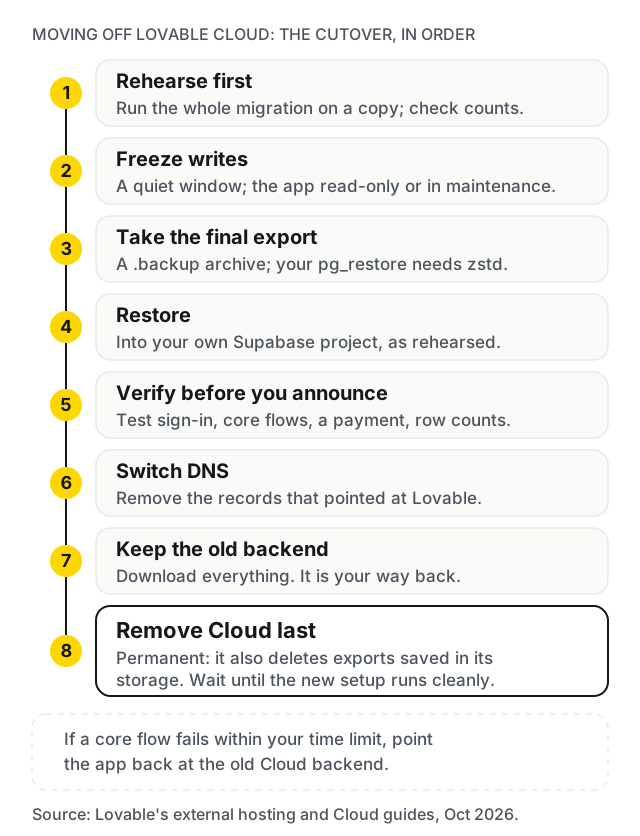
- Rehearse first. Run the whole migration against a copy, time it, and check row counts table by table.
- Freeze writes for the switch. Pick a quiet window, put the app into a read-only or maintenance state, take the final export, restore, and switch.
- Verify before you announce. Sign in as a test user, check the core flows and a payment, and compare counts against the baseline.
- Keep the old backend. Lovable warns that removing Cloud "permanently deletes your Cloud instance and cannot be undone", including exports saved in its storage. Download everything, keep it until the new setup has run cleanly for a while, and remove Cloud last.
- Tell users about the sign-in. One line in an email saves a wave of support requests.
If the cutover fails
Decide the rollback before you start, not during. The simplest plan:
- Set a time limit for verification, for example two hours after the switch.
- If a core flow fails and cannot be fixed within it, point the app back at the old Cloud backend, which you have not removed.
- Writes made to the new backend during the attempt need copying back or replaying. Keeping the window short and quiet keeps that list small.
- Fix the cause on the rehearsal copy and try again another day.
The first week after
- Watch the Edge Function and database logs daily for errors that did not appear in testing.
- Check that each scheduled job ran once, and only on the new backend.
- Reconcile Stripe: every payment in the week should match an account with the right access.
- Confirm backups are running on the new project, and download one.
- Rerun the two-account test and the Security Advisor.
Moving the front end too
If you also want to host the app yourself, the same guide says older React and Vite apps build to static files that any static host can serve, as long as it falls back to index.html for client-side routes, while TanStack Start apps need a server: a platform that supports them, a container, or your own Node.js server, built with a Nitro preset such as node-server. VITE_ variables are embedded at build time, so rebuild after changing them, and add the new domain to your auth provider's allowed redirect URLs.
Move DNS last. Verify on a temporary URL first. When you switch, remove the records that pointed at Lovable, and check for leftover AAAA and CAA records; Lovable's custom domain guide lists them as common causes of a domain showing the wrong site or failing its certificate, and the same applies in reverse.
Cancel deliberately. Changing hosting or exporting code does not cancel your Lovable subscription or Cloud usage. Lovable's pricing FAQ says that if you cancel, you keep your remaining credits until the end of the billing period, then drop to the Free plan.
Common mistakes
- Moving to fix a problem that lives in the code. Slow queries and missing checks arrive at the new host intact.
- Copying secrets instead of reissuing them. Use the move to rotate.
- Removing Cloud as soon as the new backend works. It cannot be undone, and it deletes exports saved in its storage.
- Restoring with a
pg_restorethat lacks zstd support. It lists the archive and restores nothing. - Forgetting scheduled jobs. Either they stop, or they run twice.
- Leaving the domain, Stripe or OAuth app in someone else's name. You find out when you need to change it.
- Skipping the rehearsal. The first run always finds something.
When not to hire us: if you have one developer, modest traffic and no contractual requirements, option 1 or 2 is probably enough, and you can do it yourself with Lovable's guides. Moving for its own sake costs money you could spend on users.
How Easify can help
The €99 Prototype Check has a person review your repository and live app and send, within 48 hours of payment and access, the top security and data risks in writing and a view on which option fits, then a 15-minute call. The €99 is credited against the build if you hire us. For a migration, the next step is the five-day audit, quoted after the check.
For a partial or full rebuild, the MVP Scoping Sprint gives you a written scope and a fixed build price in about two weeks for €900, credited in full against the build if you build with us. A rebuild is scoped like any MVP: typically €4,000 to €25,000 over 4 to 12 weeks, at €25 to €45 an hour with a €1,000 minimum project. If you are wondering how founders pay for that, our guide to MVP grants and funding in Europe covers the main schemes. We deploy client products hosted in the EU. We are based in Budapest and work remotely across Europe on CET, in English or Hungarian, with our engineering team in India; invoices are in euros, issued by our registered entity in India.
If your app came from another builder, compare the routes in Lovable vs Bolt vs v0 for an MVP.
Work with us
Outgrowing Lovable and worried about the data?
We are a Budapest team that takes AI-built apps to production for founders across Europe, working remotely on CET, and we deploy client products hosted in the EU. Start with the €99 Prototype Check: a person reviews the repository and live app and tells you in writing, within 48 hours, which option fits and what the risks are. Send the repository and live URL, and we reply within one business day.
Start a conversation ↗ Prototype to Production
On this page
- At a glance
- Signals that it is time
- What a move fixes, and what it does not
- The options
- 1. Export to GitHub and keep building there
- 2. Harden in place
- 3. Move the backend, keep the front end
- 4. Partial rebuild
- Before you migrate: the inventory
- How to move off Lovable Cloud without losing data
- What moves and what does not
- The cutover, in practice
- If the cutover fails
- The first week after
- Moving the front end too
- Common mistakes
- How Easify can help
Frequently asked
Will my users lose their passwords if I move off Lovable Cloud?
Not if you follow Lovable's migration steps. Its external hosting guide says password hashes are included in the database export, so users keep their passwords. Sessions do not carry over, because the new project signs them with its own keys, so everyone has to sign in again once after the switch.
What does the Lovable Cloud export leave out?
Lovable's documentation says the export contains the database, structure and data, including user accounts, but not files in storage, secrets or connections. Files are downloaded separately, Edge Function code is in the repository and deployed with the Supabase CLI, scheduled jobs need checking and recreating, and secrets must be set again by hand.
Can I keep using Lovable after I move my backend to my own Supabase?
Yes. Lovable supports connecting your own Supabase project, and its migration guide ends by pointing the Lovable project at the new backend. You can keep Lovable for interface work while developers own the database, auth and payments through GitHub.
Can I move back to Lovable Cloud later?
Not at the moment. Lovable's Cloud documentation says migration from Supabase to Cloud is not supported, and that removing Cloud permanently deletes the instance. Treat moving the backend as one-way, and keep the old Cloud backend until the new one has run cleanly for a while.
Is there a one-click migration from Lovable Cloud to Supabase?
No. Lovable's Cloud documentation says there is no one-click migration: you export the data, connect a Supabase project and rebuild the schema there. Remixing a Cloud project does not switch its backend. The steps are documented and manageable, but they need care and a rehearsal.
Do I have to rebuild my app to leave Lovable?
Usually not. The code is yours, syncs to GitHub on every plan and runs on other hosting. A rebuild makes sense only for the parts that cannot be made safe or fast enough, which is often the data and permission layer rather than the interface.
Will moving off Lovable make my app faster or cheaper?
Only if the platform was the cause. Slow screens usually come from queries, missing indexes or work done inside a request, and those move with the code. A rising bill from traffic can fall on separately billed hosting, but a bill from fix loops is a workflow problem. Measure first, then decide.
How long does moving off Lovable take?
Moving hosting can take a day. Moving a Cloud backend to your own Supabase depends on the data, functions and integrations involved; plan for a rehearsal on a copy before the real switch. A partial rebuild is scoped like any MVP piece of work, typically in weeks rather than days.
Keep reading
[
Edtech MVP Development: Buyers, Children's Data and Scope
[
Enterprise Ireland Funding for Startups Building an MVP
](https://easifytechnologies.com/enterprise-ireland-funding-for-startups/)
[
EU Funding for Startups: Can It Pay for Your MVP?
](https://easifytechnologies.com/eu-funding-for-startups-mvp/)


Want this done properly on your own site?