Logistics MVP Development: Tracking, Dispatch and Driver Apps
A logistics MVP needs three connected views of the same jobs: a dispatch board for the people assigning work, a driver app that works with a poor signal, and tracking for the customer waiting at the other end. Maps, routing and integrations should come from APIs rather than be built, and the hard parts are offline behaviour, job state that never goes backwards, and driver data handled lawfully. With Easify a logistics MVP typically costs €8,000 to €25,000 over 6 to 12 weeks, depending mainly on route optimisation, offline proof of delivery and the number of integrations.
Below: which kind of logistics product you are building, whether to build or buy, the job model, dispatch, the driver app, maps and routing, offline use, tracking for customers, integrations, driver data, a minimum feature set, what to leave out, a week-by-week plan, a worked example with a payback estimate, what to measure, typical scope and price, running costs, common mistakes, and when not to hire us.
At a glance
| Question | Answer |
|---|---|
| Typical price with Easify | €8,000 to €15,000 for dispatch, a web driver app and tracking; €15,000 to €25,000 with route optimisation, offline proof of delivery and one integration. Illustrative, not a quote |
| Timeline | 6 to 12 weeks |
| Included | Job model, dispatch board, driver app, customer tracking link, notifications, admin |
| Usually left out | Native apps on both platforms, a custom routing engine, telematics hardware, multi-depot planning, billing integrations beyond one |
| Maps and routing | A routing API or a self-hosted open-source engine, not your own solver |
| Offline | Jobs stored on the device, actions queued and synced, the server resolves conflicts |
| Driver data | Hosted in the EU; tracking limited to working time and stated purposes |
| First step | The €900 MVP Scoping Sprint, credited in full against the build if you build with us |
Which logistics product are you building?
"Logistics" covers products with very different MVPs. Name yours first, because it decides which of the sections below matter most.
| Product | Who uses it | What the MVP must prove | The hard part |
|---|---|---|---|
| Last-mile delivery or courier | Dispatchers, drivers, receiving customers | Jobs get done on time with less dispatcher effort | Offline proof of delivery and honest ETAs |
| Field service and visits | Schedulers, technicians, customers | The day can be planned and changed without phone calls | Time windows, skills and rescheduling |
| Freight brokerage or marketplace | Shippers, carriers, the broker's team | Loads get matched and tracked with less email | Two-sided onboarding and documents |
| Fleet and asset tracking | Fleet managers | Managers see where vehicles are and act on it | Device data and driver privacy |
| Warehouse operations | Pickers, supervisors | Orders are picked and checked faster or with fewer errors | Scanning speed and stock accuracy |
| Shipment visibility for shippers | Customers, account managers | Customers stop calling to ask where things are | Pulling status from many carriers |
The rest of this page is written mainly for the first three, which share the job model, dispatch board and driver app. Warehouse and fleet products depend more on scanners and devices, and usually start as integration projects.
Build, buy, or both
Off-the-shelf route planning and delivery tools are cheap and quick to start. Custom software earns its cost when the workflow is the product.
| Situation | Usual choice |
|---|---|
| You run deliveries and need standard dispatch and proof of delivery | Buy an existing platform |
| You sell logistics software to other companies | Build; the workflow is your product |
| Your jobs have rules no tool handles (multi-party handovers, regulated goods, unusual proof) | Build the workflow, buy maps and routing |
| You need your customers to see tracking under your own brand, from several carriers | Build the customer side, integrate the carriers |
| You need route optimisation at scale | Buy an API or host an open-source engine; never write the solver |
| You are not sure the process will last | Run it by hand on a spreadsheet and a messaging app first |
Start with the job model
Every logistics product is built on one object, the job (a delivery, a collection, a service visit or a multi-stop route), and the states it moves through. Get these right and the rest of the product follows.
- States. Created, assigned, accepted, on the way, arrived, completed, failed, cancelled. Write them down with who can move a job from each to the next.
- States only move forward. A completed job must not become "on the way" because an old update from a phone that was offline arrived late. Enforce this on the server.
- Failed is a real outcome. Nobody home, wrong address, refused, damaged. Each needs a reason code and a next step.
- Proof. What counts as done: a photo, a signature, a scanned code, a PIN from the customer, or a location at the time of completion.
- Time windows and promises. What did the customer get told, and what happens when it slips?
Dispatch
The dispatch board is where the business runs, and usually where an MVP earns its keep first.
- One screen for the day. Unassigned jobs, drivers and their current jobs, and what is late.
- Manual assignment first. Let dispatchers drag jobs to drivers. Automatic assignment can come once you know the rules they actually apply.
- Conflicts made visible. Two jobs at the same time, a driver over capacity, a job outside its window.
- Changes reach the driver. A reassigned or cancelled job must disappear from the old driver's app, even if they were offline when it changed.
The driver app
- Built for one hand and bad light. Big targets, few screens, the next job first.
- Web or native. A web app added to the home screen can do jobs, photos, signatures and offline queues, and is one codebase. Native is justified when you need location in the background, fast barcode scanning or hardware. Android's background location guidance says background apps on Android 8.0 and later receive location updates only a few times each hour, and that Google Play restricts background location to apps that need it for core functionality, with no guarantee of approval.
- Battery and data. Send location at intervals that match the purpose. Customer tracking needs more than an end-of-day report.
Maps and routing
Do not build a routing engine. Buy or host one.
- Routing and optimisation APIs. Google's Route Optimization API generates route plans for one or several vehicles and their stops, taking constraints such as vehicle capacity and time windows, and returns visit sequences, assignments and estimated times. Other commercial providers offer similar services.
- Self-hosted open-source engines avoid per-request pricing at scale, at the cost of running servers and map data updates. For an MVP, a hosted API is usually cheaper in total.
- Check pricing per request before you design. Recalculating routes every time a dispatcher moves a job can turn into a real monthly bill. Optimise on demand, not on every change.
- Geocoding quality matters more than the map. A wrong pin is a failed delivery. Let dispatchers correct an address once and keep the correction.
Offline use
Drivers lose signal in basements, warehouses and rural roads, and the app must carry on.
- Download the day's jobs when the shift starts, with addresses, contacts and instructions.
- Record actions locally with the device time and a unique ID, then send them when the connection returns. Unique IDs let the server ignore duplicates.
- Let the server decide conflicts, using the job state rules above.
- Do not depend on one browser feature. MDN lists the web Background Synchronization API as limited availability, not working in some of the most widely used browsers. Retry when the app is opened, as well.
- Show the driver what has not synced yet, so they do not hand over the phone with a day of deliveries stuck on it.
Tracking for customers
- A link, not an app. An SMS or email with a tracking page: status, an estimated time and, near the end, the driver's approximate position.
- Only while it matters. Show location from "on the way" to "arrived", then stop.
- Honest estimates. A time window that widens when the driver is late builds more trust than a precise time that is wrong.
Integrations
- Where jobs come from: an e-commerce platform, a client's order system, a CSV upload or an email. For the MVP, support one source well, and a CSV import as the fallback.
- Where results go: status webhooks to the client, a daily export for billing.
- Freight documents. If you move goods by road, the EU eFTI Regulation applies in full from 9 July 2027, when Member State authorities must accept freight information shared electronically by operators through certified eFTI platforms. An MVP does not need to become one, but storing consignment data in a structured form keeps that route open.
Driver data and the GDPR
Location data reveals where people are, so handle it as personal data under the GDPR. This is orientation, not legal advice.
- Track vehicles and jobs, not people. The EU data protection authorities' Opinion 2/2017 on data processing at work, adopted shortly before the GDPR applied and written with it in view, says vehicle tracking devices are not staff tracking devices, that employers should not use them to monitor drivers' behaviour or whereabouts, and that monitoring vehicle locations outside agreed working hours is unlikely to have a legal basis. It also says drivers should be told clearly, and, where private use is allowed, be able to switch tracking off temporarily.
- Gig and platform drivers. If drivers are organised through your app and its automated systems, you may be a digital labour platform under the Platform Work Directive, which Member States must transpose by 2 December 2026. It adds duties on automated monitoring and decision-making, including transparency (Article 9), human oversight (Article 10) and human review (Article 11).
- EU hosting. We deploy client products to EU data-centre regions, so the product is hosted in the EU. Our engineers work from India, so their access to production location data is kept to what the work needs.
- Retention. Keep detailed location trails only as long as the purpose needs, and aggregate after that.
Minimum feature set checklist
- Job model with states, enforced on the server
- Job creation by form and CSV import
- Dispatch board with manual assignment and late jobs highlighted
- Driver app: today's jobs, navigation hand-off to the phone's maps, status updates
- Proof of delivery: photo, signature or code
- Offline queue with unique action IDs and visible unsynced count
- Customer tracking link with status and estimated time
- Email or SMS notifications at the key states
- Failure reasons and rescheduling
- Admin view of drivers, jobs and history, with export
- Driver privacy notice and tracking limited to working time
What to leave out of version one
- Automatic assignment. Let people dispatch until the rules are known.
- Your own routing or optimisation. Use an API, and optimise on demand.
- Native apps on both platforms. Start with the web, or one platform if the drivers' phones allow it.
- Telematics hardware. Use the driver's phone.
- Many integrations. One job source, CSV for the rest.
- Driver scoring. It is monitoring with legal weight; leave it out until it is needed and assessed.
- Predictive ETAs and AI analytics. Start with distance and the driver's progress; you need months of real data before a model beats that.
Week by week: an operational pilot build
An illustrative plan for the larger scope on this page, about 10 weeks after the Scoping Sprint. Dispatch and tracking alone compresses to 6 to 8 weeks.
| Weeks | What happens | What you do |
|---|---|---|
| Before week 1 | Scoping Sprint: job states, offline rules, providers and their costs, fixed price | Run a week of jobs by hand and keep every failure |
| 1 to 2 | Job model and states, dispatcher and driver screens designed and tested on a real phone | Get one dispatcher and two drivers to try the designs |
| 3 to 4 | Job creation, CSV import, dispatch board, admin | Prepare real job data, addresses included |
| 5 to 6 | Driver app: jobs, navigation hand-off, status, photo and signature proof | Test in the places signal is worst: basements, depots, rural roads |
| 7 | Offline queue and sync, conflict rules on the server | Try to break it: airplane mode, two phones, late updates |
| 8 | Customer tracking link, notifications, route optimisation through the API | Check the routing provider's bill for a realistic day |
| 9 | The one integration, exports, failure reasons and rescheduling | Confirm the job source sends what the scope assumed |
| 10 | Pilot with real jobs alongside the old process, fixes | Ride along for a shift, or be in the dispatch room |
A worked example
A fictional product, to show how the scope, price and payback fit together. It is not a client, and the numbers are illustrative.
The idea. A regional courier with 15 vans delivers for local shops. Dispatch runs on a spreadsheet and a group chat, and shops phone several times a day to ask where deliveries are.
The question the MVP answers. Can one dispatcher run the day from a board, with drivers updating jobs from their phones, so that shops stop phoning?
In version one:
- Jobs from a CSV the shops already send, plus a form for one-off jobs
- A dispatch board with manual assignment, late jobs highlighted
- A web driver app: today's jobs, hand-off to the phone's maps, photo and signature proof, offline queue
- A tracking link sent to the shop and the receiver by email or SMS
- Failure reasons with a rescheduling step
- A daily export for invoicing
Left out: route optimisation (the drivers know the area), integrations with shops' systems, native apps, telematics, automatic assignment, driver scoring.
Where it falls. In the dispatch and tracking row of the price table below: roughly €10,000 to €14,000 and 7 to 8 weeks with Easify. Illustrative, not a quote.
A payback estimate you can redo with your own numbers. Suppose the dispatcher and office staff spend two hours a day answering "where is it" calls and fixing spreadsheet mistakes, and the board and tracking link remove half of that. At 22 working days and a staff cost of €25 an hour, that is 1 hour × 22 × €25 = €550 a month. Add any failed deliveries avoided, and subtract running costs (hosting, SMS, maps). The point of the exercise is not the number; it is knowing which measure the pilot has to move for the build to pay back.
What to measure in the pilot
- On-time rate: jobs completed inside the window promised to the customer.
- First-attempt success: jobs completed without a failed attempt, and the reasons when they fail.
- Dispatcher time: how long planning and replanning the day takes.
- Customer contact: calls and messages asking where a delivery is.
- Sync health: actions still unsynced at the end of a shift, and conflicts the server had to resolve.
- Driver adoption: jobs updated in the app as they happen, rather than at the end of the day.
Typical scope and price
Illustrative ranges inside our €5,000 to €25,000 MVP band, not a quote. The MVP cost calculator gives a range for your own scope.
| Scope | What it includes | Price | Time |
|---|---|---|---|
| Dispatch and tracking | Jobs, dispatch board, web driver app with status and photos, customer tracking link, emails | €8,000 to €15,000 | 6 to 8 weeks |
| Operational pilot | The above plus offline proof of delivery, route optimisation through an API, one integration, failure handling, exports | €15,000 to €25,000 | 9 to 12 weeks |
Routing API, SMS and map costs are billed by those providers and are not in these prices.
What moves a scope up or down the range:
| Cost driver | Why it costs more |
|---|---|
| Offline proof of delivery | Local storage, sync, conflict rules and testing in poor signal |
| Route optimisation | Provider integration, constraints such as time windows and capacity, and replanning rules |
| Each integration | Mapping another system's data and failures into your job states |
| Native driver app | A second codebase, store review, and background location permissions |
| Several parties per job | Shipper, carrier, receiver and dispatcher each need their own view and rights |
| Live location for customers | Location updates at short intervals, and the privacy rules around them |
| Barcode scanning at speed | Usually means native, and testing on the drivers' actual devices |
Running costs after launch
- Hosting in an EU region, which grows with jobs, photos and location history.
- Routing and maps: priced per request by most providers, so optimise on demand and cache geocoding results.
- SMS for tracking links and notifications, per message.
- App stores, if you go native: developer accounts and the time each release spends in review.
- Support and changes after launch, which is what our retainer on the pricing page covers.
For how founders pay for the build itself, including grants that can cover an MVP, see MVP grants and funding in Europe.
Common mistakes
- Designing in the office. A driver app tested only on Wi-Fi will fail on the first shift. Test where signal is worst.
- Letting job states go backwards. A late update from an offline phone reopens a completed job, and the customer gets a wrong message.
- Automating assignment too early. Dispatchers apply rules nobody wrote down; learn them first.
- Optimising routes on every change. Per-request pricing turns a dispatcher's drag and drop into a real bill.
- Tracking drivers instead of jobs. Location outside working time, or used to judge behaviour, is a legal question, not a feature.
- Treating "failed" as an error. Failed deliveries are normal; without reason codes you cannot fix the causes.
- Integrating with everything. One job source and a CSV import cover most pilots.
Case study: Rostavo
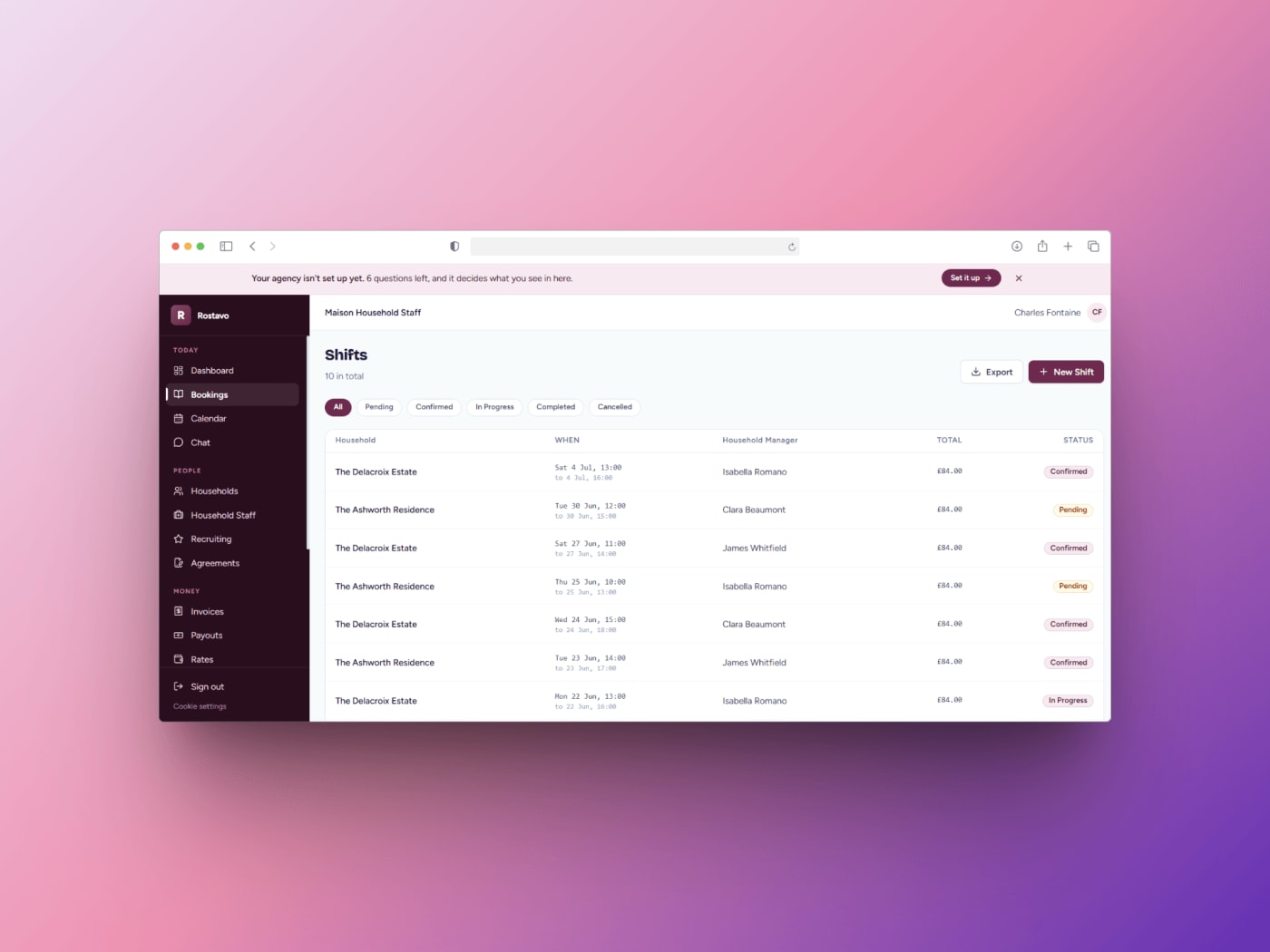
We have not built a freight or delivery product. The closest work is Rostavo, a Laravel SaaS platform for in-home service agencies that brings client bookings, staff scheduling, workforce management, invoicing, payments, compliance tracking and communication into one dashboard. Its case study describes the starting point as spreadsheets, a shared calendar and a group chat, with double bookings and staff sent to the wrong address as the result, and the decision to build one operational dashboard because the value is in a manager seeing the whole day at once. That is the dispatch problem in a different industry.
Start with the Scoping Sprint
The €900 MVP Scoping Sprint is the step we recommend before a logistics build. In about two weeks you get, in writing: the one question the MVP must answer, the smallest feature set that answers it, what is deliberately left out, the main user flows, the technical and hosting plan, and a fixed price and timeline for the build. For logistics, that includes the job states, what the driver app must do offline, and which routing and messaging providers the build assumes, with their costs. The €900 is credited in full against the build if you build with us, and the scope is yours to keep whatever you decide.
When not to hire us
- You run your own fleet and need standard delivery software. Off-the-shelf route planning and proof-of-delivery tools are cheaper unless your workflow is the product.
- The product is the optimisation algorithm. That needs operations research specialists, not an MVP agency.
- You need deep telematics or warehouse hardware integration in version one. That is an integration project before it is an MVP.
- You have not run the process by hand. Dispatch a week of jobs on a spreadsheet and a messaging app first; you will learn the real states and failures.
For how we run MVPs generally and what you own at the end, see MVP development.
Work with us
Need a dispatch and driver app that works on a real shift, not just in a demo?
We are a Budapest team that builds MVPs for founders across Europe, working remotely on CET, and we have built scheduling and staff assignment software for service agencies. Send us who dispatches, who drives, what customers need to see, what systems you must connect to and your deadline, or ask for the €900 MVP Scoping Sprint, which is credited in full against the build if you build with us, and we reply within one business day.


Frequently asked