Take a Lovable App to Production

To take a Lovable app to production, lock down the database first: row-level security on every table, no service role key anywhere in the front end, and Stripe events handled by a verified webhook rather than a success page. Then give yourself a way to recover: a separate database for testing, migrations in Git, backups you have restored once, and tests on sign-up and payment. Last come the launch details a preview never exercises: your own domain, real email delivery and error alerts. If you want someone to look first, Easify's €99 Prototype Check returns the top security and data risks in writing within 48 hours.
This guide covers how a Lovable app is put together, the documented weak points, a worked example of the most important fix, a self-check you can run this afternoon, a launch-week checklist, and how to decide whether to stay on Lovable or move off it.
At a glance
| Question | Answer |
|---|---|
| What Lovable produces | Apps created since 13 May 2026: TanStack Start, rendered on the server. Older apps: React and Vite, rendered in the browser. Both on a Postgres backend (Lovable Cloud or your own Supabase) |
| Biggest risk | Missing or permissive row-level security on tables the browser can query with the public key |
| Second biggest | Roles and permissions checked in the interface rather than in the database, an Edge Function or a server function |
| Easy to miss | On Lovable Cloud, drafts and the live app share one database, so there is no staging copy by default |
| Quick first step | Log in as two different users and try to read each other's rows |
| Prototype Check | €99, a person reviews the repo and live app, top risks in writing within 48 hours, then a 15-minute call |
| Credit | The €99 comes off the build if you hire Easify |
| Send | GitHub repository access, the live URL, a test login, and whether you use Lovable Cloud or your own Supabase |
How a Lovable app is built, and why it matters
Which Lovable you have depends on when the project was started. Lovable's FAQ says apps created from 13 May 2026 (22 June 2026 for Enterprise workspaces) use TanStack Start, which renders pages on the server, while older apps use React and Vite and render in the browser. You cannot pick another framework such as Next.js. Check package.json before anything else.
The backend is the same in both: a PostgreSQL database, either on Lovable Cloud, which Lovable describes as built on Supabase's open-source foundation (database, auth, storage, Edge Functions and secrets), or in a Supabase project you connect yourself. Lovable Cloud asks you to pick a region (Americas, Europe or Asia Pacific) and, in its own words, "you cannot change the selected region" afterwards. If your customers are in the EU, check which one your project uses now, while moving is still cheap.
In an older, browser-rendered app there is no server of your own between the user and the data. The browser calls the database API directly with a public key, and anything that needs a secret runs in an Edge Function. The database's own rules are then your entire security model: a forgotten policy is every row of a table, available to anyone who opens the browser console. A newer app can also run code on the server, which helps, but any code that uses the Supabase client with the public key is still bounded only by those rules, and every server function is an endpoint that has to check who is calling.
The risks specific to Lovable apps
Row-level security: the one that matters most
Supabase's row-level security (RLS) decides which rows each user may read and write. Without it, the public key is enough to read the whole table.
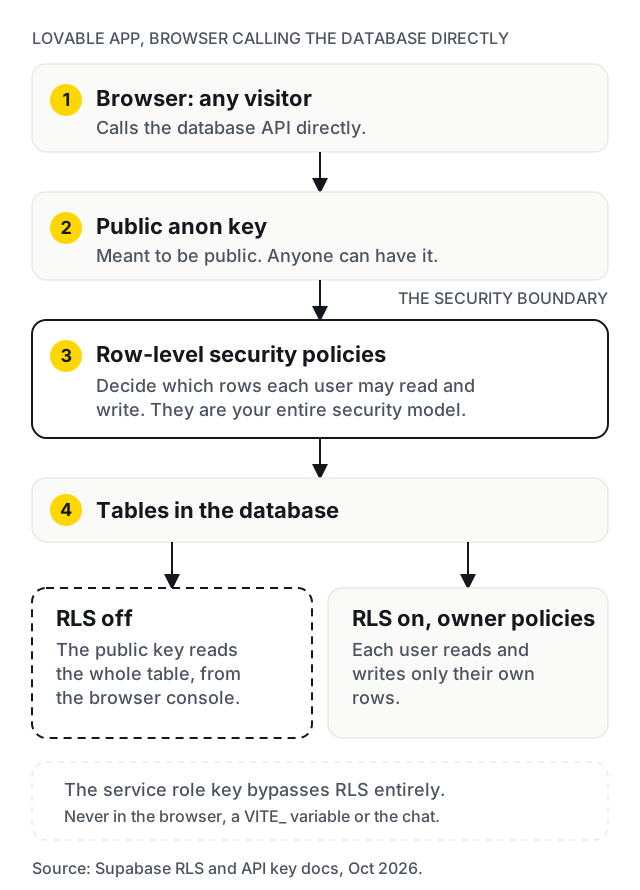
This is not hypothetical. CVE-2025-48757 records Lovable-built apps whose tables could be read, and in some cases written, by anyone holding the public key, because RLS was missing or insufficient. Lovable disputes the CVE on the grounds that each customer is responsible for their own app's data, which is precisely the point: the responsibility is yours.
Lovable's security tools now come in two depths. A Quick scan runs when the publish dialog opens and checks database access rules, leaked-password protection and known vulnerabilities in npm dependencies. A Deep scan also reads the application code for access control, unauthenticated endpoints, injection, leaked secrets, payment logic and exposed personal data, but it does not run automatically; you start it. The same page says "misconfigured RLS rules are a common cause of data leaks" and that the tools "do not replace a thorough security review". The patterns to look for:
- RLS enabled with a policy of
true. The scan sees RLS switched on; the policy still lets everyone through. - Ownership checked on read but not on update. A user cannot see other people's rows but can change their own
roleorplancolumn toadminorpro. - Insert policies with no
with checkclause, so a user can create rows that claim to belong to someone else. - Storage buckets left public for files such as invoices, IDs or contracts.
- Policies that filter on columns with no index. Supabase's RLS guidance recommends indexing the columns policies use; without it, every query slows as tables grow.
- A blanket grant pasted to silence a new-table error. Since 30 October 2026, Supabase no longer exposes new tables in the
publicschema to the Data API automatically, on every project, according to its changelog. Existing tables keep their grants. A table added after that date answers with error42501, "permission denied for table", even when its RLS is right, and the hint suggests a grant toanon. Grant only what each role needs:anonusually needs nothing on a table that holds user data. Then check that RLS is on before the table goes live. Supabase errors and missing data covers the error itself.
A worked example: one table, done properly
Say the app has a projects table with a user_id column. This is the shape of a correct set of policies, in the form Supabase's RLS guide uses:
alter table public.projects enable row level security;

create policy "Owners read their projects"
  on public.projects for select to authenticated
  using ((select auth.uid()) = user_id);

create policy "Owners create their own projects"
  on public.projects for insert to authenticated
  with check ((select auth.uid()) = user_id);

create policy "Owners update their projects"
  on public.projects for update to authenticated
  using ((select auth.uid()) = user_id)
  with check ((select auth.uid()) = user_id);

create policy "Owners delete their projects"
  on public.projects for delete to authenticated
  using ((select auth.uid()) = user_id);

create index on public.projects (user_id);
Three details carry the weight. The update policy has both using (which rows you may touch) and with check (what the row may look like afterwards), so nobody can hand their project to another account. Wrapping auth.uid() in a select is the form Supabase recommends for performance. And the index keeps the policy fast as the table grows.
For anything that decides privileges, such as a role or a paid plan, the safer pattern is a separate table that users can read but never write, updated only by an Edge Function or a webhook. A role column on a profiles table that users may update is the most common privilege escalation in these apps.
Auth and roles checked in the interface
The demo hides the admin page from ordinary users. That is a display choice, not a permission. Every role check needs to exist where the user cannot edit it: in an RLS policy, or in an Edge Function or server function that verifies the user's token before doing anything privileged. Also test the auth paths a demo never takes: password reset, an expired session, the same user logged in on two devices, and an email change.
Keys in the wrong place
The Supabase anon (publishable) key is meant to be public. The service role key bypasses RLS entirely, and Supabase's API key guide says it must never reach the browser. Both stacks build with Vite, and in Vite any variable prefixed VITE_ is compiled into the front-end bundle, so a secret stored that way is published to every visitor. Lovable's documentation says the same in its own words: secrets cannot be stored safely in client-side code, and belong in Secrets, used from Edge Functions. If a key was ever pasted into the chat or committed to GitHub, rotate it.
Payments and Stripe webhooks
The common prototype shortcut is to mark a user as paid when Stripe redirects them to a success page. Anyone can visit that URL. Access should be granted only from a Stripe webhook handled in an Edge Function, with the signature verified and duplicate events ignored, because Stripe can deliver the same event more than once. Take the price from your own server or Stripe, never from a value the browser sends. Then check what happens on a failed renewal, a refund and a cancelled subscription. A demo exercises none of them.
No staging database by default
This is the Lovable-specific gap most founders do not know about. Lovable's database docs say "every draft uses the same database as your project", and that edits in the Database view "apply directly to your project's database, the same database your published app uses". Lovable does not remove or rename existing tables or columns from a draft, which limits the damage, but it means every experiment with the schema happens next to customer data.
If you stay on Lovable Cloud, keep schema changes small and additive, and take a backup before any change you are unsure about. If you need a true staging copy, connect your own Supabase project and create a second Supabase project for testing.
Backups and recovery
On Lovable Cloud, the same docs say Lovable takes a daily backup and keeps "up to roughly 14 days". Restoring is permanent and loses anything written after the snapshot, the backups do not include stored files, and there is no restore to an arbitrary point in time. On your own Supabase project, Supabase's backup docs say Pro projects get 7 days of daily backups and Team projects 14, point-in-time recovery is a paid add-on, Free projects should export their own data with the CLI, and no plan's database backups include Storage files. Whichever you use, back up uploaded files separately, and do one practice restore before launch.
Email that actually arrives
If you connected your own Supabase project, its built-in email service is not for launch. Supabase's SMTP guide says the default server is "not meant for production use", only delivers to addresses in your project's team, and is limited to 2 messages an hour. Sign-up confirmations and password resets to real customers need your own SMTP provider, with your domain's sender records set up. Test a sign-up from an outside address before launch day.
Scaling and cost
The usual limits are queries rather than servers. Lists that fetch a whole table and filter in JavaScript, one request per row on a dashboard, and no pagination all work at demo size and degrade as data grows. Edge Functions and server functions that call slow third-party APIs inside a user's request are the other common bottleneck; move that work to a background job. Any function that calls a paid AI or email API needs a per-user limit, or one bored visitor can run up your bill. On Lovable Cloud, hosting and backend usage are paid from the same credit balance as building, so a launch spike draws on it too.
Tests, CI and migrations
Lovable's GitHub sync works both ways on one branch, by default main. That is convenient and also means every prompt can change production code with no review and no tests. Check whether the database schema exists in the repository as migration files, or only as whatever state the last prompt left it in. Production needs migrations under version control, backups you have actually restored, and a CI run on every change: at least a type check and end-to-end tests of sign-up, the core action and payment.
Lock-in and hosting
The code is portable: Git sync works on every plan, paid plans can download the whole codebase, and Lovable documents running the app on hosting you choose. The backend depends on where it lives. If you connected your own Supabase project, you already own it, and Supabase is open source. If it is on Lovable Cloud, Lovable's documentation says "there is no one-click migration from the built-in backend (Cloud) to your own Supabase project": you export the data, connect a new project and rebuild the schema, and the export leaves out stored files, Edge Function code and secrets. That is manageable for a prototype and worth deciding early, before the data grows.
A self-check you can run today
- Open the table editor. Is RLS enabled on every table that holds user data?
- Read each policy. Does any say
true, or checkauth.uid()on select but not on update? - For any table created since 30 October 2026, check what was granted to
anonandauthenticated. Was it a blanket grant added to fix a "permission denied" error? - Create two test accounts. Logged in as one, try to load the other's records by changing an ID in the URL. In the browser console, try querying the other user's rows directly.
- Try to change your own
roleorplancolumn as an ordinary user. - Search the repository for
service_role,sk_live,sk_testand anyVITE_variable holding a secret. - Check storage buckets: which are public, and what files are in them?
- Find where a user becomes paid. Is it a webhook with a signature check, or a redirect?
- Look for a
supabase/migrationsfolder, or any record of schema changes. - Find your most recent backup, and restore it somewhere that is not production.
- Run Lovable's Deep scan and read every finding, not just the count.
- Check whether
mainon GitHub is protected and whether anything runs tests on it.
If any answer is "I don't know", that is the place to start.
Launch week: what to have in place
| Item | What "done" looks like |
|---|---|
| Domain | Custom domain connected on a paid plan. Lovable's domain docs say DNS can take up to 72 hours, though most changes are live within a few hours, so connect it days before launch, not on the morning |
| Your own SMTP provider sending sign-up and reset emails from your domain, tested from an outside address | |
| Auth settings | Redirect URLs and site URL updated from the preview address to the real domain |
| Payments | Live Stripe keys in Secrets, a live webhook pointing at the production function, one real low-value payment made and refunded |
| Errors | An error-tracking service on both the front end and the functions, alerting a named person |
| Uptime | An outside uptime check on the home page and one API call |
| Backups | A backup taken on launch day, and stored files copied somewhere else |
| Rollback | You know which commit is the last good one and how to republish it |
| Legal | Privacy policy and cookie consent that match what the app actually collects |
Common mistakes in Lovable launches
- Treating a clean Quick scan as a security review. It checks configuration, not whether your policies express the right rules.
- Fixing RLS by prompting until the error goes away. The fastest way to make a permission error disappear is a policy that allows everything.
- Testing only as yourself. Every leak in this guide is invisible to a single logged-in user.
- Changing the schema on a live app with no backup. On Lovable Cloud, the draft and the live app share one database.
- Choosing the Cloud region by accident. It cannot be changed later.
- Launching on the default email service. Customers never receive the confirmation link and assume the app is broken.
When to stay on Lovable, and when to move off
Stay on Lovable while you are still finding out whether anyone wants the product, when the app holds little personal data and no payments, or when it is an internal tool used by a few people you trust. Fix the RLS and key issues anyway; they are cheap now.
Use a hybrid once you have paying users: keep Lovable for interface work, move the backend to your own Supabase project so you can have a staging copy and choose your backup plan, and route changes through pull requests with tests and a review of anything touching the database, auth or money.
Move off it when several developers need to work in parallel, when you need server-side logic that Edge Functions make awkward, or when the RLS model has become too complex to reason about. Usually the interface survives and the data and auth layer is rebuilt. When to move off Lovable goes through the signs in more detail.
When not to hire us: if the app is a demo for investors, a landing page or a tool only you use, you do not need a production review. Spend the money on users.
What the €99 Prototype Check covers
The Prototype Check is a short, human review for apps built with Lovable, Bolt, v0, Replit, Cursor or similar. For a Lovable app, the person reviewing it looks at both the repository and the live app, with particular attention to:
- RLS on every table and the policies behind it, tested against the live app with two accounts;
- where roles and permissions are enforced;
- keys in the bundle, the repository and environment variables;
- storage bucket access;
- how payment status is set and whether webhooks are verified;
- whether there are migrations, backups and a separate database for testing.
Within 48 hours you get the top security and data risks in writing, ranked, followed by a 15-minute call to go through them. It is a triage, not the full audit. Request it with the Prototype Check form; we reply within one business day with a payment link.
What happens after it
You can take the written findings and fix them yourself, or give them to any developer. That is a perfectly good outcome.
If you want Easify to do the work, the next step is the five-day audit described on the same prototype to production page, quoted after the Prototype Check, followed by the fixes it identifies. If the honest answer is a rebuild, it is scoped like any MVP, starting with the MVP Scoping Sprint: €900 and about two weeks for a written scope and a fixed build price, credited in full against the build if you build with us. A typical MVP build is €4,000 to €25,000 over 4 to 12 weeks, at €25 to €45 an hour with a €1,000 minimum project. The MVP cost calculator gives a rough range before you talk to anyone, and grants and funding for MVPs in Europe covers how founders pay for it. The €99 Prototype Check is credited against the build if you hire us.
We are based in Budapest and work remotely across Europe on CET, in English or Hungarian. Client products are deployed to EU data-centre regions; our engineering team is in India, and the people you talk to are in Budapest. Invoices are in euros. If your prototype came from a different tool, the sibling guides cover Bolt, v0 and Replit.
Work with us
Built it in Lovable and about to let real users in?
We are a Budapest team that takes AI-built apps to production for founders across Europe, working remotely on CET. Start with the €99 Prototype Check: send the GitHub repository, the live URL and whether you use Lovable Cloud or your own Supabase project, and we reply within one business day.
Frequently asked