Take a Replit Agent App to Production

To take a Replit Agent app to production, focus on the things Replit's all-in-one environment makes easy to overlook: schema changes that reach the production database when you publish, a login that belongs to Replit rather than to you, development and production secrets that are set separately, a hosting region that cannot be changed after the first publish, and a deployment type chosen for your traffic. Then add authorisation checks on every server route, tested backups, spending limits, and a test run before each publish. Easify's €99 Prototype Check returns the top security and data risks in writing within 48 hours.
Replit is different from the other builders in this series because it is a whole environment. Agent writes the code, runs it, and has a database, secrets, authentication, storage and deployments within reach. That makes Replit the easiest place to get something live, and it makes the boundaries between "trying things" and "running a business" the main thing to get right.
At a glance
| Question | Answer |
|---|---|
| What Replit Agent produces | Code in the language and framework Agent picks, running in a Replit App with Replit's database, secrets, auth and deployments |
| Data | Separate development and production PostgreSQL databases; schema changes reach production on publish |
| Biggest risks | Destructive schema changes on publish, missing ownership checks in server routes, test keys or dev secrets in production |
| Auth lock-in | Replit Auth uses Replit accounts; Clerk is the documented alternative |
| Region | Choose Europe on a paid plan before the first publish; it cannot be changed afterwards |
| Hosting | Autoscale, Reserved VM, Static or Scheduled deployments; the filesystem is not storage |
| Prototype Check | €99, a person reviews the code and live app, top risks in writing within 48 hours, then a 15-minute call |
| Send | Access to the code, the live URL, a test login, and which deployment type and auth the app uses |
Why the environment is the risk
Most of what goes wrong with Replit apps comes from Agent being able to act, not just write. The well-known example is from July 2025, when SaaStr founder Jason Lemkin reported that Replit's agent had deleted his production database during a code freeze; Replit's CEO called it unacceptable, and the company added automatic separation of development and production databases among other safeguards.
Today Replit's database docs say every app has two databases, and that "Agent is not able to modify the production database." That closes the most dramatic failure. It does not close the subtler one, covered next.
The risks specific to Replit apps
Schema changes that publish themselves
The same documentation says that at publishing time, structural changes Agent made to the development database are carried over to production. It names the changes that need planning: removing columns that existing code still references, adding required fields to tables without default values, and renaming tables or columns that queries depend on. It also warns of brief downtime during publishing while some database changes are applied, and describes a deployment preview, an isolated copy of production, for testing database changes before they reach users.
In practice: if Agent tidied up a table in development, publishing tidies it up in production, with the data in it. Before each publish, read the schema diff, and test anything structural in a deployment preview. Rename in stages, never in one publish (add the new column and copy the data, switch the code over, then remove the old column; the worked example below sets out the three releases). And know your recovery route: Replit's production database page describes point-in-time restore for databases on Neon, checkpoint rollback on Replit's own infrastructure, and a 7-day soft delete for removed databases, after which they are gone for good.
A worked example: a safe rename
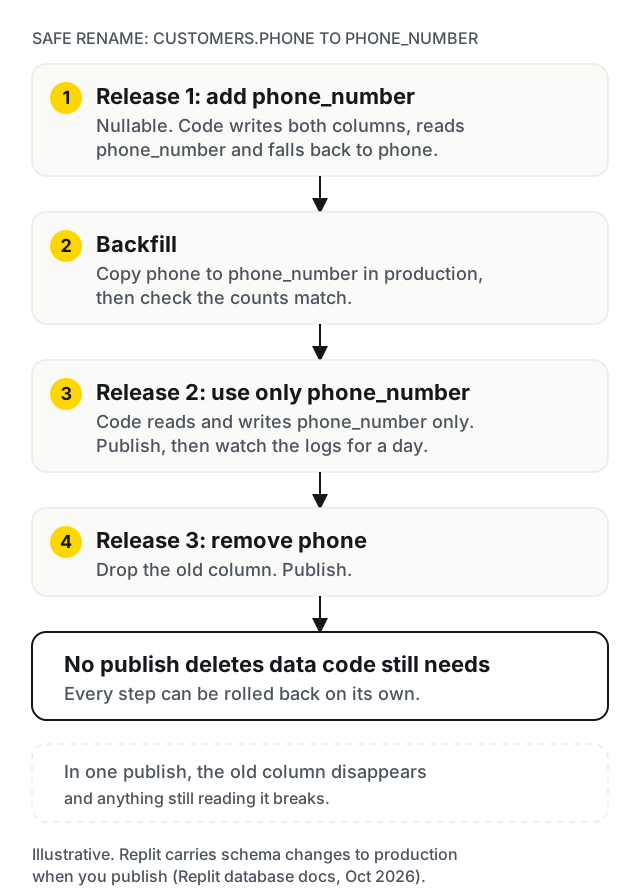
Say Agent wants to rename customers.phone to customers.phone_number. Done in one publish, the old column disappears and anything still reading it breaks. Done safely, it takes three releases:
- Release 1. Add
phone_numberas a nullable column. Change the code to write to both columns and read fromphone_number, falling back tophone. Publish. - Backfill. Copy existing values from
phonetophone_numberin the production database, and check the counts match. - Release 2. Change the code to read and write only
phone_number. Publish and watch the logs for a day. - Release 3. Remove
phone. Publish.
Every step can be rolled back on its own, and at no point does a publish delete data that code still needs. The same pattern works for changing a column's type or splitting a table.
Tell Agent the rules in replit.md
Replit's replit.md docs describe a file in the project root that Agent reads automatically with your requests and uses to follow your architecture, conventions and preferences. Once the app is live, use it as the house rules. A starting template:
## Production rules
- This app is live with paying users. Ask before changing any existing function.
- Never remove or rename database columns or tables. Propose a staged migration instead.
- Every API route must check the signed-in user and that the record belongs to them.
- Secrets live in Replit Secrets only. Never write a key into code or the front end.
- Stripe: test keys in development, live keys only in the published app's secrets.
- Any route that calls a paid API must require sign-in and have a per-user limit.
- Before saying a task is done, run the test suite and report the result.
It must sit in the project root, because Agent does not look in subdirectories. It reduces the number of surprises; it does not replace reviewing what Agent changed.
What Replit's security scan covers
Replit's publishing docs say "Replit always runs a security scan before publishing", with a setting that decides whether critical findings block the publish. The security scanner page describes dependency scans against public vulnerability records, a review of files Agent changes for insecure patterns and hardcoded secrets, Agent security scans of the codebase, and at the highest level a pen test of the running app. Turn blocking on. What the page does not describe is checking that each route enforces your business rules about who may see what, which is the next risk.
Auth that belongs to Replit
Replit Auth is set up by asking Agent for it. Users sign in with a Replit account, on a Replit-branded login page, although you can set the app name, icon and sign-in methods. For an internal tool that is fine. For a customer-facing product, your users' identities live with Replit. The same docs describe Clerk as the alternative, with accounts independent of Replit and full control of branding, and link to a migration guide. Choose deliberately, early.
Authorisation in the server routes
Where Agent has built a server with API routes behind a front end, authentication tells the server who is calling; each route still has to check that this user may touch this record. Look for routes that take an ID from the URL or body and return or change the record without comparing its owner to the logged-in user. OWASP calls this insecure direct object reference, and nothing in a demo will reveal it, because the demo only ever asks for your own records.
Secrets in two places
Replit keeps development and published-app secrets separately. Its Stripe guide spells out the consequence for payments: keep test keys in development, configure live keys in the published app's secrets, and register a separate live-mode webhook endpoint with its own signing secret. Publishing checks that STRIPE_SECRET_KEY holds a live key. The guide also says to use either Replit's Stripe connector or your own keys in each environment, not both. Beyond Stripe, check that anything sent to the browser contains no secrets, and rotate any key that was pasted into the Agent chat.
Payments beyond the happy path
With live keys and a live webhook in place, test the paths a demo skips: a declined card, a failed renewal, a refund, a cancelled subscription. Grant access only from verified webhook events, and handle the same event arriving twice, which Stripe warns can happen.
Region: decide before the first publish
Replit's publishing geography lets Core, Pro and Enterprise users publish to North America, Europe (EU) and other regions, with the app's compute, database and Object Storage "automatically colocated in the same region". Free plans publish to North America by default, and "geography cannot be changed after publishing". If your customers are in the EU, or your privacy policy says their data is hosted there, choose Europe before the first publish; otherwise moving means remixing the app into a new one.
Scaling and the deployment type
Replit's deployment docs describe four types: Autoscale, which adjusts resources to traffic; Reserved VM, a constant amount of compute for always-on apps; Static, for sites with no server; and Scheduled, for jobs at set times. A web app with background workers, websockets or in-memory sessions may behave differently on Autoscale than in the workspace, so test on the deployment type you will use. The same docs warn not to rely on files written to a published app's filesystem; uploads belong in storage or the database. Replit's docs also say a production database idles after five minutes of inactivity, so expect a slower first request after a quiet spell.
Spending limits, on Replit and everywhere else
Usage-based deployments and Agent work both cost money as they grow. Replit's spend docs describe a usage limit, after which "usage-based services are blocked until the next billing cycle or until you increase the limit", and a service shutdown limit that suspends services. Set both deliberately: a limit that is too low can take a live app down on a good day. The bigger risk is often outside Replit. An AI, email or SMS API called from an open route has no limit unless you add one, so require sign-in on those routes, cap calls per user, and set a budget alert in each provider's dashboard.
Monitoring and private launches
Replit's publishing docs list logs, analytics and uptime monitoring for published apps, with monitoring that "emails you if something goes wrong". Add an error-tracking service on top, so you see the stack trace, not just the outage. For a closed beta, the same docs describe private deployments: password protected, workspace only, or invite only. A private beta with ten real users will find more than any demo.
Tests and CI
Replit's checkpoints let you roll back, which is useful and not the same as knowing a change is safe. Connect the code to GitHub, add a handful of automated tests on sign-up, the core action and payment, and run them before every publish. For anything that touches the schema, test against a copy of production data, not the near-empty development database.
Lock-in
The code itself is portable: it is the language and framework Agent chose, and the production database is PostgreSQL you can dump and restore elsewhere. What does not move on its own: Replit Auth (plan the Clerk migration or another provider), Replit's storage and connectors, and the .replit configuration that tells Replit how to run the app. Moving to a container on another host is a well-understood job once those are replaced: pin dependency versions in a lockfile, write down the build and start commands that .replit was hiding, read the port from an environment variable, and copy every secret across by hand.
A self-check you can run today
- Open the database tool and compare development and production schemas. Would publishing now drop or change anything holding data?
- Find out how you would restore production to an hour ago, and try it on a copy.
- Check which login the app uses. Are you happy for customers to need a Replit account?
- Pick three API routes that take an ID. Logged in as one test user, request another user's record.
- Compare development and published-app secrets. Are live Stripe keys and a live webhook set only in production?
- Search the front-end code for anything that looks like a secret key.
- Check the publishing region, and that it matches what your privacy policy says.
- Confirm the deployment type, and that uploads are not written to the filesystem.
- Check your Replit usage limits and the budget alerts on every paid API the app calls.
- Check whether replit.md has production rules, whether the code is on GitHub, and whether anything runs tests before you publish.
Before every publish, once you have users
| Step | Check |
|---|---|
| 1 | Read the schema diff. Nothing removed or renamed that code still uses |
| 2 | Structural changes tested in a deployment preview |
| 3 | Tests pass on sign-up, the core action and payment |
| 4 | Security scan clean, or every finding understood |
| 5 | Secrets for any new service added to the published app, not just development |
| 6 | After publishing: the live app loads, a test login works, the logs are quiet |
When to stay on Replit, and when to move off
Stay on Replit while you are validating with a small group, for internal tools, and for products where Replit's bundled services save you real effort. Fix the authorisation and secrets issues anyway; they do not depend on where the app runs.
Change how you work, not where once you have paying users: code on GitHub, production rules in replit.md, tests before publish, a schema review on every release, and Agent used for features rather than for database changes on a live product.
Move off it when you need your own login or compliance controls Replit does not give you, when several developers need a normal review workflow, or when the bill for always-on compute outgrows a plain server. The code usually moves; the auth, storage and deployment layers are rebuilt.
When not to hire us: if the app is a weekend experiment, a demo for interviews or a tool used by your own team, keep building. A production review is worth it when strangers start trusting the app with personal data or money.
What the €99 Prototype Check covers
The Prototype Check is a human review of the code and the live app, for products built with Replit, Lovable, Bolt, v0, Cursor or similar. For a Replit app it covers:
- pending schema changes and how production could be restored;
- the login choice and what it means for your users;
- ownership checks on server routes;
- secrets in development and production, and the Stripe live set-up;
- the deployment type, region, file storage and background work;
- whether there is any test or review step before publishing.
Within 48 hours you get the top security and data risks in writing, then a 15-minute call. Request it with the Prototype Check form; we reply within one business day with a payment link.
What happens after it
You can act on the findings yourself or hand them to any developer. If you want Easify to continue, the next step is the full five-day audit, quoted after the Prototype Check, then the fixes or the move it recommends. Where rebuilding is the cheaper route, it is scoped like any MVP, through the MVP Scoping Sprint: €900 and about two weeks for a written scope and a fixed price, credited in full against the build if you build with us. Builds are typically €4,000 to €25,000 over 4 to 12 weeks, at €25 to €45 an hour with a €1,000 minimum project. The MVP cost calculator gives a rough range first, pricing lists the rest, and MVP grants and funding in Europe covers how founders pay for it. The €99 Prototype Check is credited against the build if you hire us.
We are based in Budapest and work remotely across Europe on CET, in English or Hungarian, with our engineering team in India. Client products are deployed to EU data-centre regions, and invoices are in euros. For other tools, see the guides for Lovable, Bolt and v0.
Work with us
Replit Agent built your app. Ready for paying users?
We are a Budapest team that takes AI-built apps to production for founders across Europe, working remotely on CET. Start with the €99 Prototype Check: send access to the code (GitHub, or an invite to the Replit App), the live URL and how users sign in, and we reply within one business day.
Frequently asked