Take a v0 App to Production

To take a v0 app to production, treat it as what it is: a Next.js application on Vercel whose interface is usually ahead of its security. Check every Server Action and route handler for authentication and ownership checks, keep secrets out of NEXT_PUBLIC_ variables, put Next.js on a patched version, give the connected database its own access rules, move to a commercial Vercel plan with a spend limit, and route changes through GitHub with tests. Easify's €99 Prototype Check returns the top security and data risks in writing within 48 hours.
v0 is the most conventional of the AI app builders. Its docs describe working with Next.js, Tailwind and shadcn/ui, and every project deploys to Vercel. That is good news: the code is a framework developers already know, and the path to production is well documented. It also means the risks are Next.js and Vercel risks, which are subtler than "the database is open": public endpoints that look like functions, framework versions that need patching, functions running on the wrong continent, and a bill that grows with traffic.
At a glance
| Question | Answer |
|---|---|
| What v0 produces | A Next.js app with React, Tailwind and shadcn/ui, deployed to Vercel, optionally synced to GitHub |
| Data | No built-in database; integrations with Neon, Supabase, Upstash or Vercel Blob via the Vercel Marketplace |
| Biggest risks | Server Actions without auth checks, secrets in NEXT_PUBLIC_ variables, auth enforced only in middleware, unpatched Next.js |
| Hosting catch | Vercel Hobby is non-commercial only; a business needs Pro or above |
| EU catch | Vercel Functions run in Washington, D.C. by default; set an EU region next to your database |
| Lock-in | Low: Next.js can be self-hosted. Vercel-specific services need replacing if you move |
| Prototype Check | €99, a person reviews the repo and live app, top risks in writing within 48 hours, then a 15-minute call |
| Send | GitHub repository access, the live URL, a test login, and the integrations and auth provider you used |
How a v0 app is put together
Unlike Lovable or Bolt, v0 does not bring a backend of its own. Its database docs list integrations with Neon, Supabase, Upstash and Vercel Blob. Adding one provisions an account with that provider and adds the connection variables to your project. Authentication is whatever v0 wired in at your request: Supabase Auth, an auth library, or a hosted provider.
With GitHub connected, v0 pushes to a working branch, each branch gets a preview deployment, and publishing merges a pull request into the base branch. GitHub becomes the source of truth for the code. That is the best starting point for CI of any tool in this series, if you use it.
The risks specific to v0 apps
Server Actions are public endpoints
Next.js handles form submissions and mutations with Server Actions. They look like functions inside a component, which makes them easy to forget are endpoints. The Next.js data security guide is explicit: you "should still treat Server Actions as reachable via direct POST requests and verify authentication and authorization inside each one", and a page-level auth check "does not extend to the Server Actions defined within it".
The pattern to look for in generated code is an action such as deleteProject(id) that checks the user is logged in, or checks nothing, and never checks that the project belongs to them. That is an insecure direct object reference: any logged-in user can delete anyone's project by sending a different ID. The same applies to route.ts handlers.
A worked example: the same action, before and after
A typical generated action looks like this:
'use server'
export async function deleteProject(id: string) {
  await db.project.delete({ where: { id } })
  revalidatePath('/projects')
}
Any request that reaches it deletes any project. The production version checks three things before it touches data: who is calling, whether the input is what it should be, and whether the record belongs to them.
'use server'
export async function deleteProject(id: string) {
  const user = await getCurrentUser()            // 1. who is calling
  if (!user) throw new Error('Not signed in')

  const parsed = z.string().uuid().safeParse(id) // 2. is the input valid
  if (!parsed.success) throw new Error('Bad id')

  const result = await db.project.deleteMany({   // 3. only their own record
    where: { id: parsed.data, ownerId: user.id },
  })
  if (result.count === 0) throw new Error('Not found')
  revalidatePath('/projects')
}
The ownership check lives in the query itself, so there is no gap between checking and deleting. getCurrentUser, db and the validation library will differ in your app; the three steps should not. Put the first and third in a small server-only data access layer, as the Next.js guide recommends, so every action uses the same checks.
Auth only in middleware
Redirecting logged-out users in middleware (called proxy in recent Next.js versions) is fine as a convenience. It is not a security boundary on its own. CVE-2025-29927 let attackers skip Next.js middleware entirely with a crafted header in unpatched versions, and every route that relied solely on middleware for authorisation was exposed. Check permissions again where the data is read or changed.
Framework versions are part of your security
A v0 app depends on Next.js and React releases staying patched. The clearest example is CVE-2025-55182, disclosed on 3 December 2025 with a CVSS score of 10.0: an unauthenticated attacker could send a crafted request to a Server Function endpoint and run code on the server. The React team's post lists next among the affected frameworks and gives the patched Next.js release for each version line, and notes that an app can be vulnerable even without its own Server Functions if it supports React Server Components. Generated projects pin whatever version was current when they were created, so check package.json against that list, upgrade, and set up automated dependency alerts on the GitHub repository so the next one reaches you.
Secrets and the NEXT_PUBLIC_ prefix
Next.js inlines any variable prefixed NEXT_PUBLIC_ into the JavaScript sent to the browser at build time. A database URL, a Stripe secret key or an AI provider key with that prefix is published to every visitor. Generated code sometimes adds the prefix to make an error go away. Search for it and read each one.
A related leak: passing a whole database record from a Server Component to a Client Component sends every field to the browser, including ones the screen never shows. Next.js recommends a server-only data access layer that returns only the fields the interface needs.
The database behind the integration
If the integration is Supabase and any code talks to it from the browser, row-level security applies exactly as it does in a Lovable app: every table needs policies that restrict rows to their owner. If the database is Neon or another Postgres reached only from the server, there is no RLS safety net by default, so every query must filter by the current user in code, as in the example above.
v0's own docs note that it can generate and execute SQL against SQL integrations, "including creating, updating, and dropping tables". Point v0 at a development database or a branch, never at the one holding customer data.
Payments
Stripe belongs in a route handler that verifies the webhook signature and handles duplicate events, with entitlements granted only from the webhook. Route handlers on Vercel run as functions, so the webhook needs the raw request body for verification; code that parses JSON first will fail signature checks, and the tempting "fix" is to delete the check. Make sure nobody did.
Function region: where your code actually runs
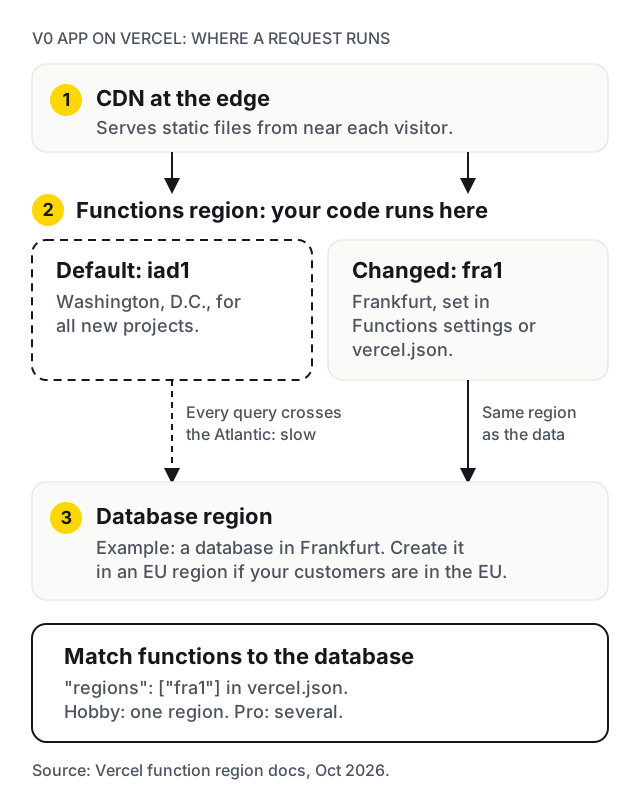
Vercel serves static files from its CDN near each visitor, but its function region docs say Vercel Functions run in Washington, D.C. (iad1) "for all new projects" unless you change it. If your database is in Frankfurt and your functions are in Washington, every query crosses the Atlantic, which is slow, and it may not match what your privacy policy tells European customers. Set the default region in the project's Functions settings or with "regions": ["fra1"] in vercel.json, and create the database in an EU region to match. Hobby allows a single region; Pro allows several.
Scaling and cost on serverless
Under load, Vercel runs many function instances at once, and each one can open its own database connection. Use the pooled connection string your provider offers, or you will run out of connections at the first real spike. Watch function duration limits for slow work such as PDF generation or AI calls, and move long jobs to a queue.
Then put a ceiling on the bill. Vercel's Spend Management, on Pro, lets you set a spend amount with alerts at 50, 75 and 100 per cent, and optionally pause all production deployments when it is reached. Three details from the docs matter: setting an amount "does not stop usage on its own" unless pausing is switched on; spend is checked every few minutes, so pausing can lag; and pausing does not stop v0 usage billed to the team. A cap is the brake. The fix is to make expensive routes hard to abuse: require sign-in on anything that calls a paid AI or email API, limit calls per user, and add a WAF rate limit, which Vercel offers on all plans (one rule per project on Hobby, 40 on Pro).
Tests, previews and environments
Vercel sets environment variables separately for Production, Preview and Development. A common mistake is a preview deployment pointed at the production database, so every branch v0 creates can write to live data. Give previews their own database. Then add CI on the GitHub repository: type check, lint, and end-to-end tests on sign-up, the core action and payment, with branch protection so v0's pull requests cannot merge until they pass. v0's docs confirm it respects GitHub branch protection and required reviews.
Rollback
Vercel's Instant Rollback points your domain back at an earlier production deployment in seconds. On Hobby you can only go back one deployment; on Pro, to any earlier production deployment. Two caveats from the docs: environment variables are not rolled back, and databases are not either, so a rollback after a schema change can leave old code facing a new schema. After a rollback, Vercel also stops promoting new pushes automatically until you undo it. Make schema changes additive so a code rollback stays safe.
Hosting, plans and lock-in
Vercel's fair use guidelines restrict Hobby to non-commercial personal use, and count taking payments or advertising a product as commercial. A startup on Hobby is on the wrong plan.
Lock-in is the lowest of the four tools in this series. Next.js is open source and can be self-hosted on Node.js or Docker; this site, built on Next.js, runs in Docker on our own server. The Next.js self-hosting guide lists what to plan for when you leave: a reverse proxy in front of the server for slow-connection attacks, payload limits and rate limiting; image optimisation, which works with next start but may need memory configuration on Linux; a shared cache if you run more than one instance; and one NEXT_SERVER_ACTIONS_ENCRYPTION_KEY across instances, or Server Actions fail with "Failed to find Server Action". Vercel Blob and other platform storage, and cron jobs in vercel.json, need replacing. Staying on Vercel is often the right call; it is good to know you could leave.
Common deployment errors and their usual cause
| Symptom | Usual cause |
|---|---|
| The latest v0 changes are not live | The working branch was never merged, or production builds from a different branch |
| Build fails on Vercel but the preview worked | A type error or missing dependency the v0 preview tolerated |
Pages call localhost in production |
A hard-coded development URL instead of an environment variable |
| Sign-in redirects to the wrong address | The auth provider's allowed redirect URLs still list the preview domain |
| API routes return 500 errors | A variable set for Preview but not for Production |
| Database tables are missing | Migrations were run against the development database only |
| "Too many connections" under load | A direct connection string instead of the provider's pooled one |
| "Failed to find Server Action" after self-hosting | Several instances without a shared encryption key |
A self-check you can run today
- Search for
NEXT_PUBLIC_and confirm none of the values is a secret. - Open every file containing
'use server'and everyroute.ts. Does each one check the user, validate its input, and check that the record belongs to them? - Find where the app decides who is an admin. Is it checked on the server for every admin action?
- Compare your Next.js version with the patched releases listed for CVE-2025-55182 and CVE-2025-29927.
- In Vercel, compare the Production and Preview environment variables. Do previews use a separate database?
- Check the function region, and that the database is in the same part of the world.
- If you use Supabase from the browser, confirm RLS on every table.
- Confirm the Vercel plan is Pro or above if the product is commercial, and that a spend amount is set.
- Check the Stripe webhook handler verifies signatures with the raw body.
- Confirm
mainis protected and something runs tests before a merge.
When to stay on v0, and when to move off
Stay on v0 for interface work. It is very good at it, and with GitHub sync and branch protection you can keep using it for screens and components while developers own the server code.
Split the work once you have users: v0 for UI changes, reviewed pull requests for anything in 'use server' files, route handlers, auth, database access or payments.
Move off it when v0's pull requests start fighting a hand-written data layer, or when most changes are backend work it is not suited to. Moving off v0 does not mean moving off Next.js or Vercel; the app stays the same, only the way changes are made is different.
When not to hire us: if the app is a marketing site or a clickable prototype with no accounts or payments, you probably need a Vercel Pro plan and a domain, not a review.
What the €99 Prototype Check covers
The Prototype Check is a person reviewing the repository and the live app, for products built with v0, Lovable, Bolt, Replit, Cursor or similar. For a v0 app it focuses on:
- Server Actions and route handlers: authentication, ownership checks and input validation;
- where auth is enforced, and whether middleware is the only line;
- the Next.js and React versions against known advisories;
NEXT_PUBLIC_variables, and data passed to Client Components;- the database integration, its access rules and its region;
- the Stripe webhook and how entitlements are granted;
- environments, previews, spend limits and the Vercel plan.
Within 48 hours you receive the top security and data risks in writing, then a 15-minute call. Request it with the Prototype Check form; we reply within one business day with a payment link.
What happens after it
You can fix the findings yourself or hand them to any Next.js developer. If you want Easify to carry on, the next step is the five-day audit, quoted after the Prototype Check, then the work it identifies. We have built production Next.js before, including the Dealtous marketplace, with seller verification, authentication and an integrated payment system. Where a rebuild is cheaper than repair, it is scoped like any MVP, through the MVP Scoping Sprint: €900 and about two weeks for a written scope and a fixed price, credited in full against the build if you build with us. Builds are typically €4,000 to €25,000 over 4 to 12 weeks, at €25 to €45 an hour with a €1,000 minimum project. MVP grants and funding in Europe covers how founders pay for it. The €99 Prototype Check is credited against the build if you hire us.
We are in Budapest, working remotely across Europe on CET, in English or Hungarian, with our engineering team in India. Client products are deployed to EU data-centre regions, and invoices are in euros. For other tools, see the guides for Lovable, Bolt and Replit.
Work with us
Built the front end in v0 and need the rest to hold up?
We are a Budapest team that takes AI-built apps to production for founders across Europe, working remotely on CET, and we build and self-host Next.js ourselves. Start with the €99 Prototype Check: send the GitHub repository, the live URL and the integrations you connected, and we reply within one business day.

Frequently asked