Website Conversion Audit: A Step-by-Step Checklist
A website conversion audit is a structured review of why visitors are not doing the one thing your site exists for: buying, booking, enquiring or signing up. You check that the numbers are being measured correctly, find where in the journey people drop out, watch real sessions to see why, and finish with a ranked list of fixes. For a small business site it is a few days of focused work; most of the tools are free.
If you would rather have someone else look first, Easify's free website conversion audit is done by a person, not a crawler: a short video of someone attempting your main action, and a prioritised fix-list, within 48 hours.
What a conversion audit covers
A conversion audit (also called a conversion rate audit or a CRO audit) is narrower than a general website audit. It ignores anything that does not affect whether a visitor completes a goal. In practice it covers five areas:
- Measurement. Are conversions tracked at all, and tracked once? A surprising number of audits end at this step because the numbers everyone was worrying about were wrong.
- The funnel. Where people enter, which steps they pass through, and where they leave. This is the part sometimes sold separately as a conversion funnel audit.
- The pages that matter. The landing pages, product or service pages, pricing, the form and the checkout: whether the offer is clear, the next step is obvious and the page answers the objections a buyer has.
- Friction. Slow pages, broken forms, mobile layouts that hide the button, error messages that do not say what went wrong, fields nobody needs to fill in.
- Trust. Reviews, guarantees, real contact details, clear pricing or at least a clear way to get a price.
It is not the same as a UX audit, which looks at usability across the whole site, or a website review, which is a broader health check. We compare those two in website review vs UX audit; a conversion audit borrows methods from both but judges every finding by one question: does this stop someone converting?
Signs your website needs one
You do not need a conversion audit because a blog post says so. You need one when one of these is true:
- Traffic is steady or growing and enquiries or sales are not.
- Paid campaigns get clicks that do not turn into leads, so every lead costs more each month.
- A redesign or replatform went live and conversions dropped, and nobody can say which change did it.
- People abandon the form or the basket at a step you can name.
- You are about to spend money on more traffic. Fixing the leak first is almost always cheaper than filling the bucket faster.
The website conversion audit checklist, step by step
Work through the steps in order. Each one depends on the one before it: there is no point watching recordings of a funnel you have not defined, or redesigning a page when the tracking is broken.
1. Define the conversions and the baseline
Write down the primary conversion (the purchase, the booked call, the quote request) and the secondary ones that lead to it (adding to basket, starting a form, clicking a phone number). Then record the current figures for a fixed period, ideally the last 90 days, split by device and by traffic source.
- One primary conversion named, with its current rate
- Secondary conversions listed
- Baseline recorded by device (mobile, desktop) and by channel (organic, paid, direct, referral)
- Known seasonality or campaign spikes noted, so you do not mistake them for trends
2. Check the tracking before you trust it
Open the site in a private window, complete every conversion yourself and confirm each one appears in your analytics once, with the right value. Google's Tag Assistant and the DebugView in Google Analytics 4 show events as they fire.
- Every conversion event fires, and fires only once (thank-you page refreshes and double submits are the usual culprits)
- Form submissions are counted on success, not on button click
- Cross-domain steps (a booking tool, a payment page) keep the session together
- Consent banner behaviour is understood, so you know what share of visits you cannot see
- Analytics totals roughly agree with the CRM, the shop backend or the inbox
If this step finds problems, fix them and collect fresh data before going further.
3. Map the funnel and find the biggest drop
Build the path as a funnel, for example landing page, product or service page, form or basket, checkout, confirmation, and look at the percentage that reaches each step. In GA4 this is a funnel exploration. Then break it down by device and by channel.
- Funnel built from real events, not assumed page paths
- Largest drop-off identified, in absolute numbers as well as percentages
- Mobile and desktop compared step by step
- Top landing pages listed with their conversion rate and bounce or engagement rate
- Pages with high traffic and low conversion shortlisted for the next steps
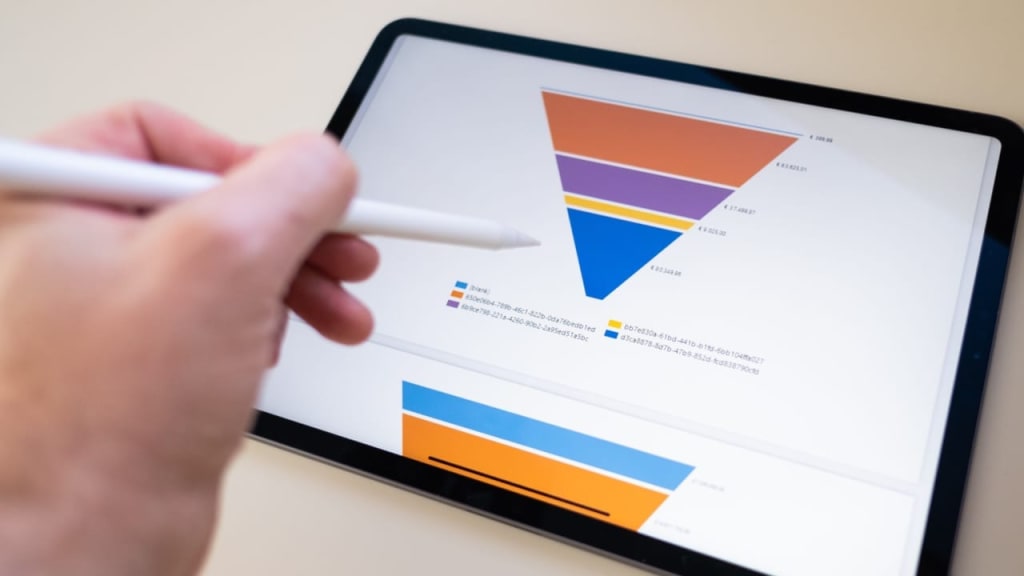
The point of this step is focus. A full audit of every page is slow and produces a list nobody acts on; an audit of the two pages where most people leave produces a short list that matters.
4. Watch what people actually do
Numbers tell you where people leave. Session recordings and heatmaps tell you why. Microsoft Clarity is free and records sessions, heatmaps and "rage clicks"; Hotjar does the same with more survey options.
- Watch 20 to 30 recordings of sessions that reached the problem step and left
- Note rage clicks, dead clicks on things that look clickable, and scroll depth on long pages
- Look for form fields where people stall or go back
- Check what people searched for on site search, if you have it
- Note any JavaScript errors in the console on the problem pages
5. Review the key pages as a first-time visitor
Go through each shortlisted page on a phone, on a slow connection, as someone who has never heard of you. For each, answer:
- In five seconds, can you tell what is offered, for whom, and what to do next?
- Does the page match the promise of the ad or search result that brought the visitor?
- Is there one clear primary call to action, visible without hunting for it on mobile?
- Are the obvious objections answered (price, timing, delivery, returns, who you are)?
- Are reviews, case studies or other proof close to the decision, not buried in the footer?
- Does the form ask only for what you need now? Every optional field is a reason to stop.
- Do error messages say what went wrong and keep what the visitor already typed?
- For shops: are delivery costs shown before the last step, and is guest checkout available? Baymard Institute's checkout research puts average documented cart abandonment at around 70% and lists unexpected extra costs and forced account creation among the most common reasons.
6. Check speed and technical friction
A slow or broken page converts nobody, however good the copy is. Run the key pages through PageSpeed Insights, which shows real-user Core Web Vitals where Google has enough data, and test the form and checkout on a real phone.
- Largest Contentful Paint, Interaction to Next Paint and Cumulative Layout Shift checked on mobile for the key pages
- Forms, payment and booking steps tested end to end on iOS and Android
- No pop-up or cookie banner covering the call to action on small screens
- Third-party scripts (chat widgets, trackers) checked for what they cost in load time
7. Ask visitors and customers
The fastest way to learn why people did not convert is to ask them. A one-question exit or on-page survey ("What is stopping you from booking today?") and a short email to recent customers ("What nearly stopped you from buying?") turn guesses into reasons. If you can, watch a handful of people try the main task; Nielsen Norman Group's long-standing guidance is that five users find most usability problems in a round of testing.
- One on-page or exit survey running on the problem page
- Recent customers asked what almost stopped them
- Sales or support asked what prospects repeatedly ask before buying
8. Write up findings and prioritise the fixes
Every finding goes in one list, with the evidence that supports it (a funnel figure, a recording, a survey answer), the page it affects, and a proposed fix. Then score each one. Simple frameworks such as ICE (impact, confidence, ease) or PIE (potential, importance, ease) are enough.
- Each finding has evidence attached, not just an opinion
- Bugs and tracking errors separated out: fix those now, do not test them
- Remaining items scored and ordered
- Each change has an owner and a metric it should move
Why "highest impact first" is not enough on its own
Ranking purely by expected impact sounds sensible and goes wrong in predictable ways:
- Impact is a guess. Before you change anything, the "impact" score is a prediction. Weighting confidence alongside it stops one loud opinion setting the roadmap.
- It ignores effort. A rebuild of the checkout may be the biggest opportunity and take three months. Ten small fixes shipped this week often move the number sooner.
- Big bundled changes cannot be read. If you ship the five highest-impact ideas at once and conversions rise, you do not know which one worked, or whether one of them made things worse.
- Low-traffic sites cannot test everything. A/B tests need enough conversions to reach a result. Below that, ship clear fixes directly, watch the trend, and save testing for the questions that are genuinely uncertain.
Tools for a conversion audit
| Job | Tools | Cost |
|---|---|---|
| Analytics and funnels | Google Analytics 4 | Free |
| Tracking checks | Google Tag Assistant, GA4 DebugView | Free |
| Search landing pages and queries | Google Search Console | Free |
| Recordings and heatmaps | Microsoft Clarity, Hotjar | Clarity free; Hotjar has a free plan |
| Speed and Core Web Vitals | PageSpeed Insights, Chrome DevTools | Free |
| Surveys | Hotjar, Typeform, a simple form | Free to low cost |
| A/B testing | VWO, Optimizely, or your platform's built-in testing | Paid |
You can run steps 1 to 7 entirely with free tools. Paid testing software only matters once you have the traffic to test with.
How long a conversion audit takes
It depends on the scope and on how much data you already have. As a rough planning guide:
- A quick review of one key page or one funnel: a few hours. Good for spotting obvious friction, weak calls to action and broken forms.
- A full audit of a small business site: two to five working days of analysis, plus however long it takes to collect enough recordings and survey answers, often two to four weeks if the tracking had to be fixed first.
- A larger shop or a site with several funnels: longer, mostly because there is more to segment and more stakeholders to interview.
The audit is the short part. Shipping the fixes and measuring them is where the time goes.
How much a conversion audit costs
A DIY audit costs your time; the tools above are free or cheap. A paid audit is priced like any other specialist work, by the hours it takes, so the useful question to ask any provider is what is included: is it an automated scan, a person reviewing pages, or a full analysis of your analytics, recordings and surveys?
At Easify:
- The website conversion audit is free: a person attempts your site's main action and sends a short video and a prioritised fix-list within 48 hours. Paid tiers on the same page add a longer video and a written report, and at the top a CRO roadmap with a list of A/B tests to run.
- Deeper audits and the work to fix what they find are billed at our normal rate of €25 to €45 an hour, with a €1,000 minimum project. The pricing page has the full list.
DIY or hire someone?
Do it yourself when the site is small, you have analytics access and a few days, and you are comfortable reading a funnel report. The checklist above is the whole method.
Get help when:
- you have looked at the site so often you no longer see it, which is the most common reason audits miss the obvious;
- the tracking is unreliable and you are not sure how to fix it;
- the fixes involve design or development your team cannot do;
- you need someone with no stake in the current design to say what is wrong with it.
A sensible middle route is to get an outside review first, then decide whether to fix things in-house. If the fixes turn into a redesign, that is our web design and development work; for a landing-page-specific take, see our SaaS landing page review framework.
Conversion audit FAQ
What is the difference between a conversion audit and a conversion optimisation audit?
Nothing in practice. Conversion audit, conversion rate audit, conversion optimisation (or optimization) audit and CRO audit all describe the same thing: finding what stops visitors converting and ranking the fixes.
What should a conversion audit deliverable include?
A short summary of the biggest problems, the evidence behind each one, and a prioritised list of fixes with an owner and a metric for each. A long report with no order to it is a sign the audit stopped at observation.
How often should you audit conversions?
After any redesign, replatform or major campaign launch, and otherwise roughly once a year, or whenever conversions drop and traffic does not.
Does a UX audit improve conversion rates?
It can, when its findings are tied to the conversion path. A UX audit that lists every usability flaw on the site is useful for a redesign; one that ranks problems by how many buyers they stop is closer to a conversion audit. Our comparison of website reviews and UX audits goes into which you need.
Can I get a free website conversion audit?
Yes. Easify's free conversion audit is a human review delivered as a short video and a fix-list within 48 hours, with no call to book.
Work with us
Found what is losing you conversions and need it fixed?
We are a Budapest web design and development team that rebuilds the pages, forms and checkouts an audit flags, for businesses across Europe, working remotely. Send us the audit, or the page you are worried about, and we reply within one business day.
Recent builds
EU College Group · Education
Website Redesign for an International Education Consultancy
- Web design
- Web development
Renta Properties · Property
Website Redesign for a UK Property Management Company
- Web design
- Web development
Beanburg · E-commerce
E-commerce Website for a Specialty Coffee Brand
- Web design
- Web development