SaaS MVP Development: What to Build and What to Skip

A SaaS MVP needs six things: sign-up that works, the one workflow customers would pay for, data kept separate per customer, a working subscription, onboarding that reaches a first result fast, and enough analytics to see whether people come back. With Easify that typically costs €4,000 to €10,000 for a single-user tool and €12,000 to €25,000 for a B2B product with teams and billing, over 4 to 12 weeks. Single sign-on, granular permissions, integrations and a public API can almost always wait.
Below: how to validate before you build, each of the six in turn, a typical stack, pricing the first plan, GDPR for B2B products, what to leave out, a minimum feature set, a week-by-week build plan, a typical scope and price, and the pitfalls specific to SaaS.
Validate before you build
A SaaS MVP tests whether people will keep paying for a workflow. Some of that can be tested before any code:
- Problem interviews. Talk to twenty people who have the problem. Ask how they handle it today, what it costs them, and what they have already tried. Do not pitch.
- Do it by hand. Run the workflow for three to five customers with a spreadsheet, a form and email. If they will not use it done by hand, they will not use it automated.
- Ask for money early. A pre-sale at a launch price, a paid pilot, or a signed letter of intent. A credit card number tells you more than a hundred "I would use that".
- Write down what would count as a yes. For example: ten paying accounts, half of them active in week four.
The MVP then builds the part that cannot be done by hand any more, and nothing else.
How a SaaS MVP differs from other MVPs
| SaaS MVP | One-off app or tool | Marketplace | |
|---|---|---|---|
| What it must prove | People keep paying, month after month | People use it | Buyers and sellers transact |
| Revenue in version one | A subscription | Often none | A commission or fee |
| Hard technical part | Tenant isolation and billing | The core feature | Payments and payouts between two sides |
| Key metric | Activation and week-two retention | Usage | Liquidity |
For the other two, see the marketplace and booking platform guides.
At a glance
| Question | Answer |
|---|---|
| Typical price with Easify | €4,000 to €10,000 for a single-user tool; €12,000 to €25,000 for B2B with teams, tenant isolation and billing. Illustrative, not a quote |
| Timeline | 4 to 12 weeks |
| Included | Auth, the core workflow, accounts and invitations, subscription billing, onboarding, product analytics, an admin view |
| Usually left out | SSO, granular roles, audit logs, public API, integrations, usage-based pricing, white-labelling, native apps |
| Suits | Founders who can name the workflow customers pay for and the first ten customers to try it |
| To get started, send | The core workflow, who uses it (one person or a team), how you plan to charge, and your deadline |
Authentication
Do not build authentication from scratch. Use what your framework or a provider gives you: Laravel's starter kits, Auth.js for Next.js, Supabase Auth, or a hosted service such as Clerk. Your MVP needs:
- email and password or magic links, with email verification and password reset;
- Google sign-in if your buyers are businesses on Google Workspace (Microsoft sign-in if they are on Microsoft 365);
- sessions that expire, and rate limits on sign-in;
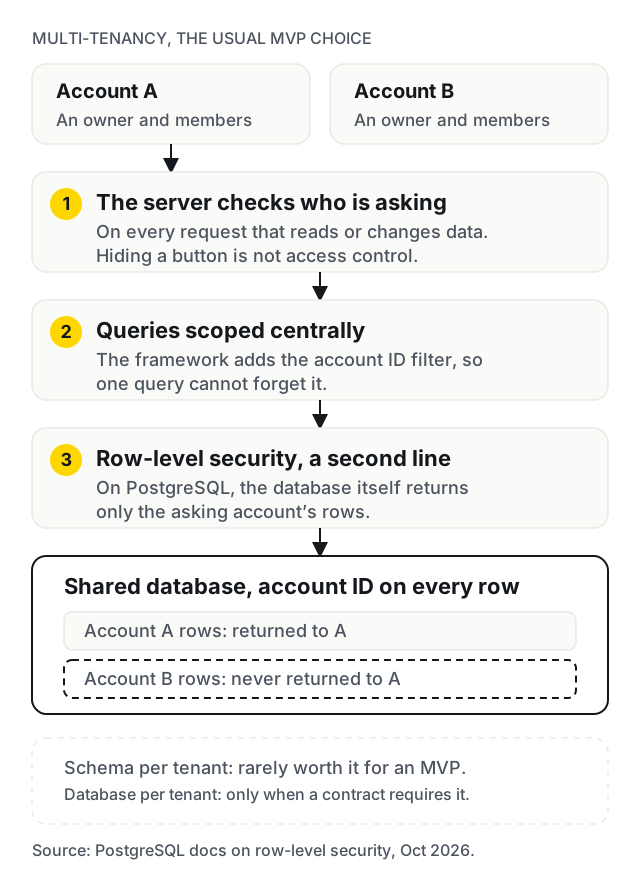
- authorisation on the server. Hiding a button is not access control. Every request that reads or changes data must check who is asking, on the server.
Single sign-on with SAML, enforced two-factor authentication and SCIM provisioning are enterprise features. Add them when an enterprise customer asks, and ideally pays.
Multi-tenancy
If you sell to teams, every piece of data belongs to an account (a tenant), and one customer must never see another's. Decide the model on day one.
- Shared database, account ID on every row. The usual MVP choice: cheap to run and simple to deploy. The risk is one query that forgets the filter, so enforce it centrally, with scoped queries in the framework and, on PostgreSQL, row-level security as a second line.
- Schema per tenant. Stronger separation, more complex migrations. Rarely worth it for an MVP.
- Database per tenant. For customers who contractually require it. Not an MVP pattern.
Keep roles to two at first: owner (manages billing and members) and member. Invitations by email, with the inviter's account attached, complete the picture.
Billing and subscriptions
If the MVP's question is whether people will pay, billing is not optional.
- Use a billing product, not your own logic. Stripe Billing with Stripe Checkout for sign-up and the customer portal for card changes, invoices and cancellations covers most of an MVP. On Laravel, Cashier wraps it.
- Or a merchant of record. Paddle and similar services sell to your customer on your behalf: Paddle describes itself as acting as a reseller, the seller on record, that collects and pays VAT and sales tax in your place. The fee is higher than a payment provider's. Worth it if you sell to consumers in many countries and want the least tax work.
- Mind EU VAT. Selling digital services to EU consumers generally means charging VAT at the customer's country rate; selling to EU businesses usually means the reverse charge, with their VAT number checked. Stripe Tax can calculate it. Confirm your own position with an accountant.
- Handle webhooks properly. Your app learns about payments, failed renewals and cancellations through webhooks. Process them reliably and idempotently, and test what happens when a card fails.
- Start with one or two plans. Monthly only, with or without a trial. Annual plans, usage-based pricing, seats and coupons are later decisions, made with data.
Onboarding
A new user should reach the result they signed up for in their first session. That is the whole job of onboarding.
- Ask only for what the first result needs; collect the rest later.
- Replace empty screens with a next step, a template or sample data.
- Offer a simple import (CSV is usually enough) if users bring existing data.
- Send one welcome email, and one follow-up to anyone who signed up but did not reach the first result.
A guided product tour is rarely the fix. A shorter path to the first result usually is.
Analytics
You need to know a few things, not everything:
- signed up;
- activated (completed the core action for the first time);
- invited a teammate, for team products;
- came back in week two;
- started paying, and cancelled.
Track those as named events in a product analytics tool. PostHog, for example, offers EU hosting; Plausible covers privacy-friendly site analytics. Check your consent requirements before setting cookies. Dashboards, cohort reports and attribution can wait until there are enough users for them to mean anything.
A typical stack
There is no single right stack, and for an MVP the best one is usually the one the team building it knows well. A common, boring and safe shape:
| Layer | Usual MVP choice |
|---|---|
| Framework | Laravel, Next.js, Rails or Django, with its own auth starter |
| Database | PostgreSQL, with an account ID on every tenant-owned table |
| Billing | Stripe Billing and the customer portal, or a merchant of record |
| A transactional email provider, with domain authentication set up | |
| Analytics | A product analytics tool with EU hosting, for five or six events |
| Errors and logs | An error tracker, with personal data scrubbed |
| Hosting | A managed platform in an EU region, with backups and a staging copy |
Easify deploys client products to EU data-centre regions. The Rostavo platform, described below, is built on Laravel.
Pricing the first plan
Pricing is a hypothesis the MVP tests, not a decision it has to get right.
- One plan, monthly, in one currency. A second plan only if you already know two clearly different buyers.
- A price you can say out loud to a customer without apologising. If the product saves an agency hours a week, price against the hours, not against the cheapest competitor.
- A free trial or a refund promise, not a free plan. A free plan with no limits tells you nothing about willingness to pay.
- Grandfather the first customers. Early customers on a launch price, honoured as you raise it, are easier to win and good references.
- Change it with data. After a few months of real sign-ups, cancellations and conversations, the second pricing page is much better than the first.
GDPR for a B2B SaaS
If business customers put personal data into your product (their customers, patients, staff or clients), they are usually the controller and you are their processor. The GDPR requires that relationship to be governed by a contract setting out the subject matter, duration, nature and purpose of the processing (Article 28). In practice:
- Have a standard data processing agreement ready. The first serious business customer will ask for it.
- List your sub-processors: hosting, email, analytics, error tracking, any AI model. Customers will ask where their data goes.
- Host in the EU where you can, and know where each sub-processor stores data.
- Keep tenant data separate (multi-tenancy above) and be able to export or delete one customer's data on request.
- Keep personal data out of logs and analytics unless you need it.
This is general guidance, not legal advice.
What to leave out
The features below are real needs for a mature SaaS product and almost never needed to answer an MVP's question:
- single sign-on, SCIM and enforced two-factor authentication;
- granular roles and custom permissions;
- audit logs and activity feeds;
- a public API and webhooks for customers;
- integrations beyond the one the core workflow cannot work without;
- usage-based or seat-based pricing, annual plans and coupons;
- white-labelling and custom domains for customers;
- native mobile apps;
- a settings page with more than a handful of settings;
- an internal admin panel beyond what you need to support the first customers.
Our MVP development page puts it this way: if the question is whether restaurant owners will pay monthly for rota scheduling, you need rota building, staff invitations and a subscription, and you do not need reporting, integrations or a settings page.
Minimum feature set checklist
- Sign-up, sign-in, email verification and password reset
- Authorisation checked on the server for every request
- Accounts (tenants) with every record tied to one, enforced centrally
- Owner and member roles, and email invitations
- The core workflow, complete and reliable
- Subscription through Stripe Billing or a merchant of record
- Customer portal for cards, invoices and cancellation
- Webhook handling for renewals, failures and cancellations
- VAT handled by the billing provider or a tax tool
- Onboarding to a first result, with empty states that guide
- Five or six tracked product events
- Transactional emails: welcome, invitation, receipt, failed payment
- Backups, version-controlled migrations and a staging environment
- Terms of service, privacy policy and a data processing agreement for business customers
A build plan, week by week
An illustrative ten-week plan for a B2B team SaaS. A single-user tool compresses weeks 3 to 8 into about three.
| Weeks | What gets built | What you can use at the end |
|---|---|---|
| 1 to 2 | Scope: the core workflow, roles, plan, exclusions, hosting plan, fixed price | A written scope you keep |
| 3 to 4 | Auth, accounts, tenants, invitations, owner and member roles | Sign up, invite a teammate, see an empty workspace |
| 4 to 6 | The core workflow, end to end | Do the one job the product exists for |
| 6 to 7 | Billing: checkout, customer portal, webhooks, VAT | Pay, change card, cancel |
| 7 to 8 | Onboarding, empty states, import, transactional emails | Reach a first result without help |
| 8 to 9 | Events, admin view, staging, backups | See who activated and who came back |
| 9 to 10 | Testing of sign-up, billing and the core workflow; launch | Live, with the first ten customers |
The scope in weeks 1 to 2 is our MVP Scoping Sprint: €900, about two weeks, credited in full against the build if you build with us.
Typical scope and price
Illustrative ranges inside our €4,000 to €25,000 MVP band, not a quote. The MVP cost calculator gives a range for your scope; rates are on pricing.
| Scope | What it includes | Price | Time |
|---|---|---|---|
| Single-user tool | Auth, the core workflow, one subscription plan, onboarding, basic analytics | €4,000 to €10,000 | 4 to 6 weeks |
| B2B team SaaS | Accounts and invitations, two roles, tenant isolation, Stripe Billing and portal, VAT, onboarding, events | €12,000 to €20,000 | 8 to 10 weeks |
| B2B with a complex core | The above plus a heavier workflow (scheduling, invoicing, documents) or one essential integration | €18,000 to €25,000 | 10 to 12 weeks |
For comparison, Kolonell estimates an agency-built SaaS MVP in Berlin at €30k to €80k over 10 to 16 weeks (Kolonell), and EltexSoft puts a focused MVP at $25k to $80k (EltexSoft). Each is one source's estimate.
Pitfalls specific to SaaS
- Tenant separation added later. Every query has to be audited, and one miss is a data breach between customers.
- Building SSO, roles and audit logs for an enterprise customer you do not have yet.
- Billing as an afterthought. Webhooks, failed payments and VAT are where subscription products quietly lose money.
- Several plans before any customer. Pricing tiers are guesses until people pay; one plan is easier to change.
- A free plan with no limits. You learn nothing about willingness to pay, and you carry the running costs.
- Onboarding by product tour. Usually a sign that the path to the first result is too long.
- No staging environment and no migrations. Fine for a demo, dangerous once customer data exists.
Case studies: Rostavo and Easify AI
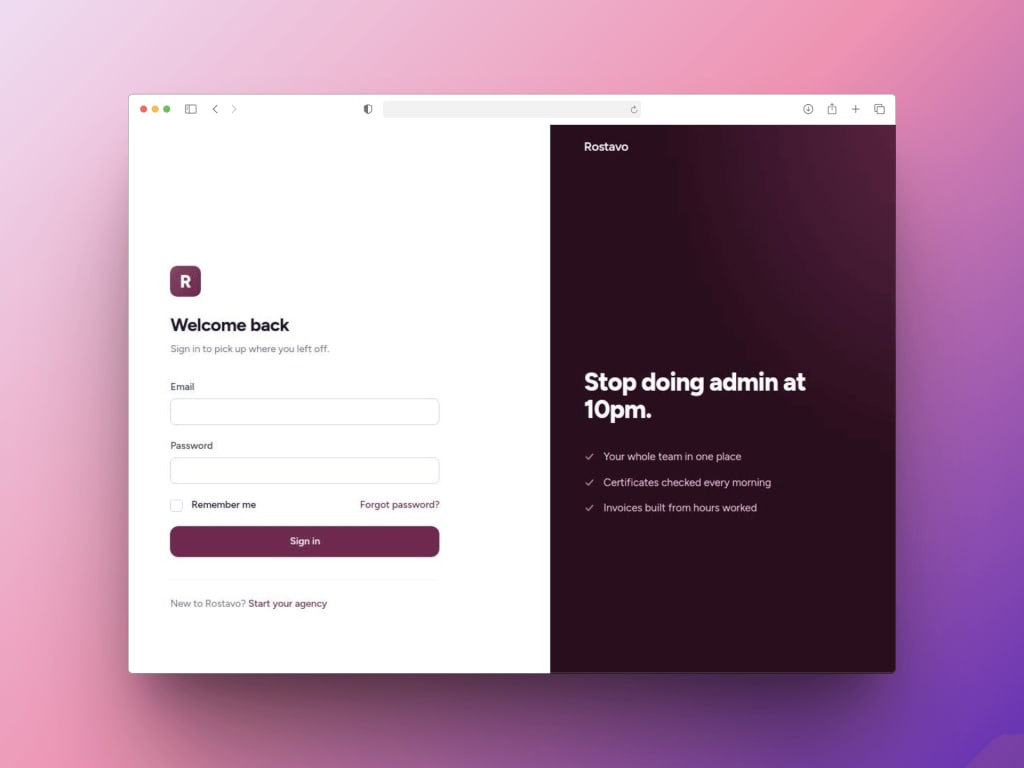
Rostavo is a SaaS platform for in-home service agencies, built by us on Laravel. Its case study describes the problem: agencies run on spreadsheets, a shared calendar and a group chat, and the cost shows up as double bookings, staff sent to the wrong address and invoices raised late. The client did not want another tool to add to the pile; they wanted one place where bookings, staff, compliance and money all live. So Rostavo was built as a single operational dashboard rather than a set of connected modules, with client bookings, staff scheduling, workforce management, invoicing, payments, compliance tracking and communication in one system and the repetitive administrative steps between them automated. It is a broad platform rather than a minimal one, and the decision that transfers to any SaaS MVP is the first one: build around the one view the customer actually needs.
Easify AI, our own AI sub-brand, answers questions about a company's database in plain English. There the MVP was scoped around the core querying flow, everything that could wait was left out, and development ran in short cycles so feedback changed the next iteration. The interface was kept plain enough for a new user to reach a result without onboarding, which is the onboarding principle above in practice. The AI MVP guide covers the AI side.
When the MVP becomes a product
An MVP has done its job when you can answer its question. Signs it is time to build the full product rather than keep testing:
- customers are paying and staying past the first couple of months;
- the same feature requests arrive from several customers, not one;
- sales are blocked by something specific, such as single sign-on or an integration, rather than by doubt about the product;
- the manual steps you kept behind the scenes are taking more time than building them would.
If it was built on proper foundations (migrations, server-side authorisation, tenant isolation, real billing), the full product is the next version of the same code. If it was a throwaway demo, it is a rebuild, which is why we build MVPs to be kept.
When not to hire us
- A spreadsheet, a form and a few automations would test the idea. If customers will pay for the outcome done partly by hand, prove that first.
- You cannot name the core workflow. "A platform for agencies" is not yet a scope. Our first conversation would be about narrowing it, and you can start that without us.
- You need an enterprise-ready product at launch. SSO, audit logs and security questionnaires on day one make it a larger project than an MVP.
Work with us
Need a SaaS MVP that real customers can sign up to and pay for?
We are a Budapest team that builds SaaS MVPs for founders across Europe, working remotely on CET. Send us the workflow customers will pay for, who uses it, how you plan to charge and your deadline, and we reply within one business day.


Frequently asked